markk80472727
Participating Frequently
January 14, 2016
Answered

Captivate file is not displaying as completed in LMS.

  • January 14, 2016
  • 2 replies
  • 1094 views

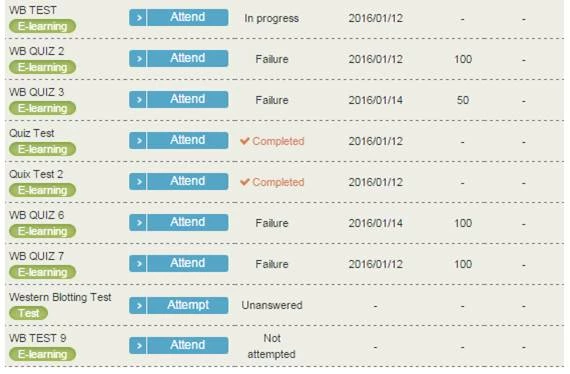
I'm having trouble getting my captivate file to properly display completed after completing the scorm requirements. 

The only completed courses displayed below are two slides long to test if it's the file that has the issue, and it seems that's the case.

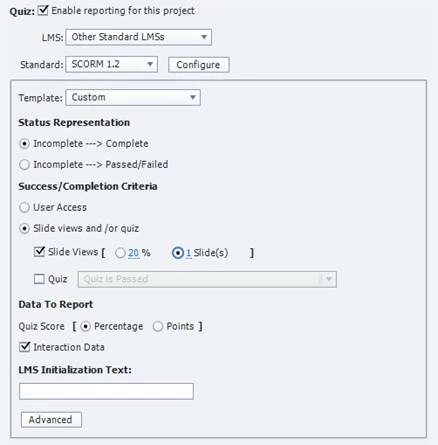
There are around 100 slides in this captivate file that isn't being registered properly. The settings for the course are attached below.

Would anyone be able to point me in the right direction to fix the issue?
    This topic has been closed for replies.
    Correct answer TLCMediaDesign

    I'm a little confused because the SCORM Cloud is showing Complete.

    Are you wanting the Success Status to show? Try selecting the Quiz checkbox and choose the criteria.

    2 replies

    TLCMediaDesign
    Inspiring
    January 14, 2016

    You could be running out of suspend_data. Try turning of interaction data and in the advanced portion do not send data on every slide.

    markk80472727
    Participating Frequently
    January 15, 2016

    I tried doing that but still no completion. Thanks for the suggestion though!

    TLCMediaDesign
    Inspiring
    January 15, 2016

    I tried that too but the result came out as a failure again. These were the settings:


    Keep them Both selected.

    Slide Views and Quiz.

    You course shows "Complete" so are you wanting Success status to show also?

    Lilybiri
    Legend
    January 14, 2016

    Did you try uploading to SCORM Cloud to test?

    markk80472727
    Participating Frequently
    January 15, 2016

    I have tried uploading it to scorm cloud, and have screen captured the results below.

    I quickly just ran through most of the slides.