


Answered
Changing The Table of Contents Show/Hide button
The Table of contents chevrons is a very small symbol.
Is there a way to have a larger symbol there instead of these tiny things?
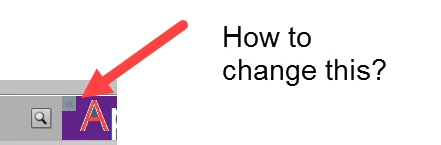

The Table of contents chevrons is a very small symbol.
Is there a way to have a larger symbol there instead of these tiny things?
Did you replace the existing button with the fully transparent one?
Paul:
Are you sitting down? You better sit down for this one.
I found out --by accident-- why I was getting the TOC chevrons to appear in the mobile breakpoint but not appear in the desktop breakpoint.
I never cleaned out my web server's folders. i.e. Whenever I would upload a new version of my learning project files (the dr, ar, assets, callees and vr folders, etc) I would drag and drop the new project files and place them over the old ones; thinking --for the most part correctly-- that everything pertinent would be overwritten.
Well, apparently not everything important was overwritten and certainly not deleted..
This afternoon, before uploading a new set of project files, I cleared out every existing file and folder from the Captivate folders on my course/content server.
I then uploaded my revised version of the project and Voila! No Chevron TOC tabs on mobile breakpoint. And no chevron TOC tabs on the desktop breakpoint either!.
So, as you can probably surmise, I don't have an LMS, just a plain vanilla ISP hosting my web site.
But this was a very interesting lesson on the importance of keeping folders clear of any OLD files.
In other words, DELETE before uploading.
Truth is stranger than fiction. Fiction has to make sense.
Have a great 2017 Paul!
Hope you had a chuckle about this.
Already have an account? Login
Enter your E-mail address. We'll send you an e-mail with instructions to reset your password.
 AdChoices