


Inspiring
August 24, 2017
Answered

Clear button for Text Entry Boxes

  • August 24, 2017
  • 1 reply
  • 1535 views

Hey Everyone,

I am currently running into an issue. I am using the 2017 Captivate Version, along with publishing to HTML5. I have an advanced action upon submit of a text entry box to look like this:
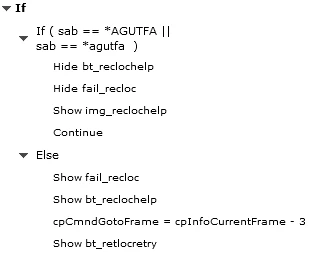
The action works if the first attempt is correct. If it is incorrect, it does display my failure message and button. But it will not allow for another entry attempt until the slide is reloaded. So my next question is:

Is there a way to reload the current slide using an advanced action or button?

If there is not, would it be possible to exit the current slide, return to the previous slide and go forward again?

Example: Upon getting the TEB wrong, you would exit slide 11, go to slide 5 to review, then upon exit of slide 11, you return to slide 5. Does this make sense?

    This topic has been closed for replies.
    Correct answer Lilybiri

    Either you have to go back a few frames using the Expression command, or you can indeed use the approach to Replay the slide with re-entering it (second scenario in this blog post: Replay (slide) Button - Captivate blog

    However, there is a bug in Captivate2017 and we are still waiting for a patch: for HTML5 output if you use that approach the On Enter action will not be executed. Workaround, which I used in this post: Playing a dice game, using While loop - Captivate blog

    You need to use a short dummy slide (0,1sec) before the present slide, with the action:

       Go to Previous slide

        Continue

    1 reply

    Lilybiri
    LilybiriCorrect answer
    Brainiac
    August 24, 2017

    Either you have to go back a few frames using the Expression command, or you can indeed use the approach to Replay the slide with re-entering it (second scenario in this blog post: Replay (slide) Button - Captivate blog

    However, there is a bug in Captivate2017 and we are still waiting for a patch: for HTML5 output if you use that approach the On Enter action will not be executed. Workaround, which I used in this post: Playing a dice game, using While loop - Captivate blog

    You need to use a short dummy slide (0,1sec) before the present slide, with the action:

       Go to Previous slide

        Continue

    heintzt96Author
    Inspiring
    August 24, 2017

    Thanks, Lilybiri.

    Is my expression off? I have tried values of 3, 5 and 10 to no use. It just simply will not allow a re-enter. However, the slide pauses as if it recognizes the TEB again. Do you know why this would be happening?

    I feel a dummy slide is my best bet at this point, but that would add on another 80 slides to my project. Additionally, is there a way to clear the text entry box's text upon re-entry of the slide from the dummy slide? I have tried the assign value option with nothing, but that doesn't work, sadly.

    curious_Coconut5EEC
    Participating Frequently
    May 17, 2021

    That worked awesome RBeers!   Thank you.


    You're most welcome. Glad it helped.