I thought I'd put down my solution to this problem here for anyone who stumbles upon this in the future.
The solution was eliminating the failure captions entirely, as Lilybiri suggested. However, instead of using shared actions, I used the timeline along with multiple new smartshapes. The picture below demonstrates.
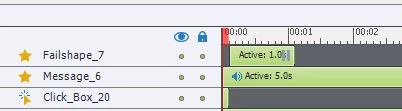
"Click_Box_20" is the button that was previously responsible for the failure caption. Now, on a correct answer, the box routes to the next slide, and on an incorrect one it simply "continues," displaying "Failshape_7", which is a smartshape overlay that tells the user what they did wrong. You cannot see it, but Click_Box_20 does pause to wait for user input, and because it lasts only .1 seconds, the user really has no time to input extraneous clicks (though it is theoretically possible). Any extraneous clicks simply trigger a "continue" prompt, so there is no real problem.
Once it is displayed, the user is prompted to click the "Failshape," which overlays the entire screen. The on-click action takes them to the next slide, so they have time to read the caption and cannot interact further with the slide.
This solution is somewhat slapdash, but it does what I needed. However, I do think a fix to the inherent problem would be nice.
The inherent problem: in any time between triggering a button failure or success and leaving the slide, a user can click and trigger the success or failure action again, and again, and again (as long as that action isn't "go to next slide" or "jump to slide" or any other immediately terminal action). This was particularly noticeable with failure captions, but it applies to any delay in slide transition after the first attempt on an action-linked item like a clickbox.
Many of my solutions to this problem that seemed reasonable were thwarted because a rapidly-clicking user could trigger multiple failures while the slide was transitioning. In fact, I suspect that if you had a machine that could input mouseclicks 100 times a second, the above solution would not prevent the failure state from triggering that many clicks. Fortunately, because the fail state is now just "continue," this would do nothing.
This was only a problem because of the advanced actions I used for the project, which involved incrementing variables. Part of the solution was changing the way my failure action worked so that it no longer involved altering a variable.
I think Adobe should consider making it so that if an action is set to one attempt only, it only allows one click. The way it is set up currently doesn't prevent these extraneous clicks, and therefore causes problems like the one I've had. Obviously, my circumstances are quite specific, and most users will never run into this problem.




 AdChoices