



Copying project file to another drive
Has anyone else encountered this problem with a Captivate 5 project file (.cptx)? --
(I have Captivate 5 and Windows 7.) I have a large Captivate project file (currently 102,900 KB). To back up this project, using Windows Explorer I have been dragging the cptx file from my C drive to one of our company network drives. This places a copy of the cptx file also on another drive as a backup. Since the file has grown larger than about 60,000 KB, I've been having the following problem --
The first time in a day that I back up this cptx file this way, it works fine. However, if I try to back the file up a second time in the the same day, the PC freezes: this window appears for a long time:
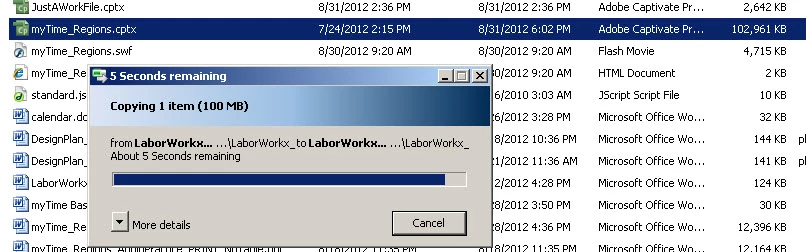
At the time of this "freeze," I invoke the Task Manager and attempt to abort the copying task. Then I select Restart for the PC, which usually doesn't work, so I end up pressing and holding the power button for the PC. Then the next time that I power up the PC, it's quite surprising, but it seems that the backed up cptx file is sitting on the drive where I had attempted to place it; however, I usually don't trust that it's a complete backup, so I go through the procedure again (i.e., dragging the cptx file from my C drive to the network drive). And since this is AFTER the PC reboot, the file backs up just fine this time.
I'm guessing that I should reboot the computer before every backup attempt of this huge file. Does anyone else have any insights about this?
Thanks much!
Jan
Thank you.
 AdChoices