


Inspiring
December 21, 2012
Question

Cp6 - bug? Publishing swf animations (graphics artifacts!)

  • December 21, 2012
  • 2 replies
  • 1400 views

Greetings everyone,

I am encountering a pretty serious problem with publishing swf animations. These are software simulations created in Captivate 5.5 and published in Captivate 6.

They work perfectly in preview mode but once published to SWF format, I am seeing a lot of graphics errors (or artifacts). If I publish using the Captivate 6 default SWF Size and Quality settings, the resulting SWFs are at their worst. However, I found that lowering the setting to Medium, the artifacts are much less noticable BUT the overall quality is worse (text is fuzzy). What the heck is wrong? I remember seeing this problem in version 4... I cannot believe it is still a problem in version 6!

Please see uploaded screen captures. The yellow arrows point to scraps that do not belong in the image.


Important notes:

1. I am not using FMR.

2. These artifacts do not appear in the source project, nor do they appear when previewing the project. They only show up once published.
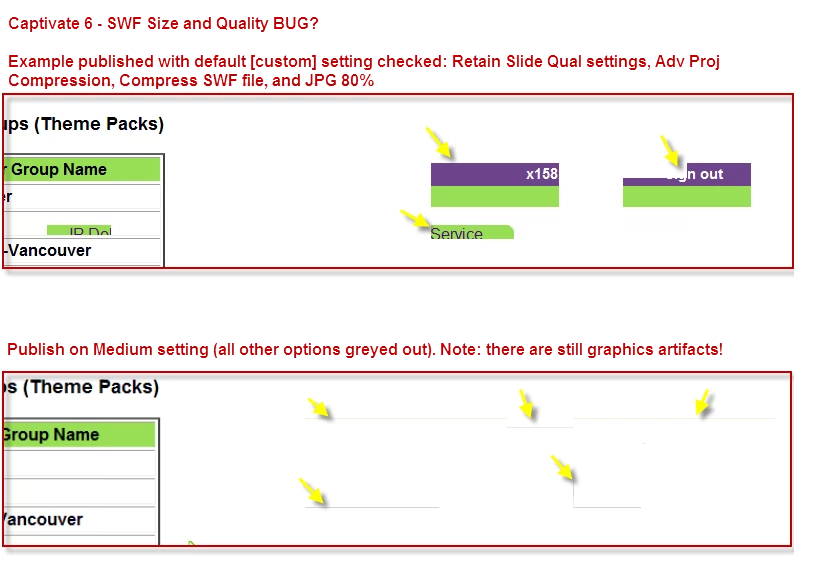
This topic has been closed for replies.

2 replies

Participant
November 7, 2013

I know this discussion is pretty old and the answer to this problem is mainly for any new comers who get that discussion by google or any other entry point.

Anyway, I experience this kind of problem often with my staffs and there's an easy fix :

If you are using a lot of .png with transparency in your project, you will encounter that issue often

Try this and re-publish your project :

* Make sure all your slide (or at least the one using a lot of .png in it) have a quality setting of High (24 bits)

- select the desired slides (or all of them)

- In the properties panel of the slides -> general : change Quality setting to High (24 bits)

Talam!

RodWard
Community Expert
Community Expert
December 21, 2012

Try turning off all compression options in Preferences, especially Advanced SWF Compression.  Then republish and check results.  If this eliminates the issue, try turning each compression option on in turn to see which one seems to affect the output.

Also, when publishing, use the option to Force Republish All Slides.

January 2, 2013

Hello Rod,

RodWard wrote:

Try turning off all compression options in Preferences, especially Advanced SWF Compression.  Then republish and check results.  If this eliminates the issue, try turning each compression option on in turn to see which one seems to affect the output.

One of my colleges encountered this problem two weeks ago in Cp 5.5 and I republished in Cp6 with the identical problem until I fiddled with the compression settings. Then it disappeared last week. It seems like a random problem.