


Known Participant
November 29, 2018
Answered

Custom Quiz and LMS

  • November 29, 2018
  • 1 reply
  • 1572 views

Hi,

I am realativly new to Captivate, and eLearning auothering, and have ran into a bit of a snag.   Been working on a project for a client, which requires a Quiz, and the ability to jump from questions back to the reference material in the previous slides,  SO I have been unable to use the in build Captivate Quiz system.  
I have followed the  'Custom Multiple Choice Final Quiz Question' on Paul Wilsons Youtube channel, and this has given me the functionilty I need in the Module.
How ever I am running into and issue when testing on the Scorm Cloud.
If the incorrect answer is selected, I have set it to a score of 1, and to not add to the total, which is working fine.  However, The results section in the Scorm results page, displays everything as correct, even if the actual answer is incorrect.

This is what I am getting on the Scorm Page..
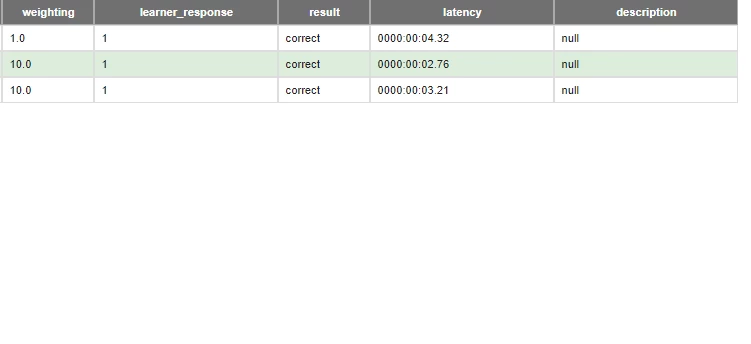
I done a test using the standard Captivate Quiz, and got this.  
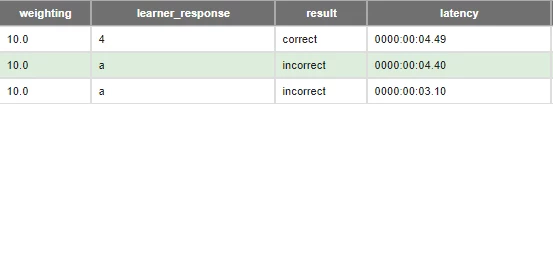
Which is what I need the custom quiz to do.


IS there any solutions to this issue ?


Thanks in advance.

Stuart

This topic has been closed for replies.
Correct answer Lilybiri

HI Lilybiri,

Thank you for your reply.

I did have a playa round with the submit all option, which did allow me to go back through the questions to get back to the main menu for example, but I am looking to get allow the user to jump from a question, to an information video/page, and then jump back to the question to answer, which I couldn't seem to get working.   Is there something I am missing in terms of that ?


Thanks


That is called Remediation. Workflow:

  • on the content slide you need a Next button
  • attach the command 'Return to Quiz' to that button
  • when the learner gets on that slide from aother content slide, the Next button will act as a normal Go to Next Slide button
  • when the learner gets to that content slide from a quiz slide, inext button will send him back to the quesiton slide.
  • Use the failure action of the quiz slide to send the learner to the content slide

There is a drawback: it means that the learner will get into a loop until he answers correctly.

1 reply

Lilybiri
Brainiac
November 29, 2018

Not a good setup probably. You could ask Paul. If you had followed one of my tutorials about custom questions (have a ton of them) I would have helped you out, here or on my blog  site. I find it very strange to add a score to an incorrect answer, but must miss something.

Known Participant
November 29, 2018

I should Clarify,

I have a score of 10 assigned to the incorrect answer, just cause it was teh default and I never changed it when I added the button to quiz, but it has only been set to Report answer, and not add the score. The main issue is just getting scorm to report an inncorrect answer as incorrect.  In my head it sounds super simple, but Just running up on a wall at the moment

I shall have have a wee look through some of your posts and see if I spot anything that could assist

RodWard
Community Expert
November 30, 2018

Yes I think you understand me correctly.  If you want people to get points for selecting only correct answers then it makes no sense to award them points for clicking the wrong answers.

Captivate's default quiz questions are more designed with traditional approaches to quizzing in mind, where the learner is expected to answer every question as they get to it and then move on one question at a time until they complete the quiz.

Captivate does have the ability configure quiz questions so that giving the wrong answer results in the learner being sent back to a content slide which contains the remedial information before then returning to the same quiz question for another attempt.  If you want to learn more about that setup you need to investigate Captivate's Help pages and some online Youtube tutorials that explain what is known as "Return to Quiz".


I see Lieve has explained Return to Quiz steps for you already.