


Participant
July 10, 2024
Answered

Custom theme not applied in Question Slide in Captivate 12.3.0.12

  • July 10, 2024
  • 1 reply
  • 329 views

Hi,


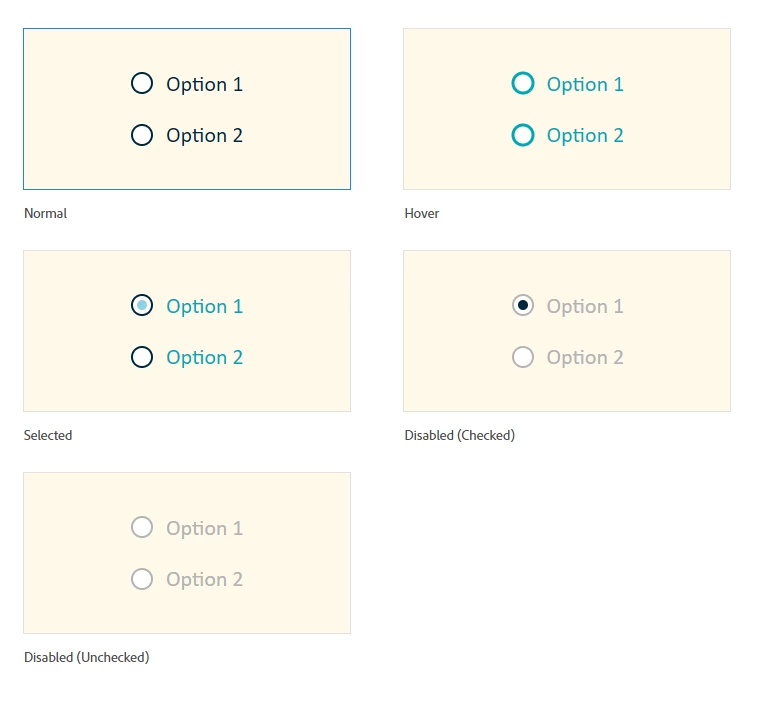
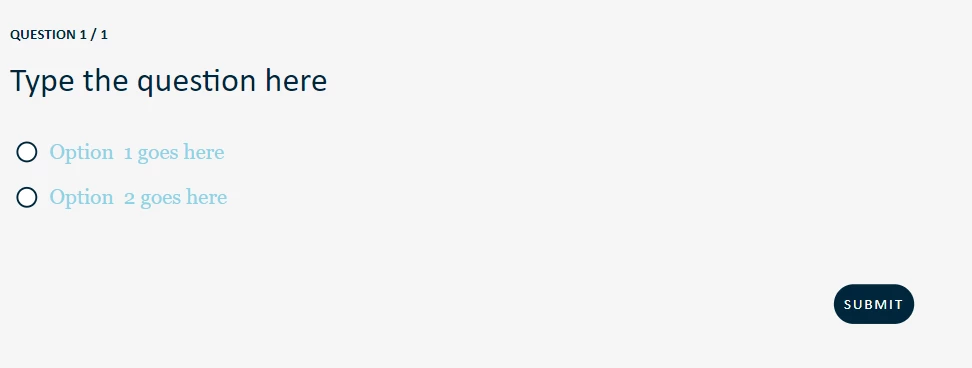
I am using Captivate 12.3.0.12. I created my own custom theme including all UI components. The custom theme was applied when I added each interactive components on the slide, however, that did not apply to the button, checkbox, radio group etc on any of the Question Slides. Please see screenshot below.


Anyone encounter the same problem and how can I solve it? Thank you in advance! 


Custom theme for radio buttons


Theme of radio button on question slides (the normal state, which is the dark blue is not shown in the radio button)
    Correct answer Lilybiri

    Indeed, the theme settings seems to be only applied to the interactive components (checkbox, radio group) but not on the similarly labeled 'components' on the question slides. In Captivate Classic the Object Style Manager had a dedicated group for Quizzing objects, but the new version has not that possibility. To be honest, the Captivate Classic didn't allow customizing the radio buttons/Check boxes on quiz slides.

    Positive: although you need to customize them slide per slide, it is sufficient to edit one of them on a slide, and it will be transferred to the other ones on the same slide. I really miss the Hamburger menu from Captivate Classic where you could have the change applied to all of the answers in the project. You can have a look at my recent blog post to see changes I applied:

    Quiz localisation New Captivate - part 1 - Captivate blog (lilybiri.com)

    Link to the project is included, you cannot embed a responsive project in an iframe.


    One of the feature requests I posted due to this blog post, which you may support:

    Missing options in UI elements in Theme – Adobe Captivate Feedback Page (uservoice.com)


    1 reply

    Lilybiri
    LilybiriCorrect answer
    Legend
    July 11, 2024

    Indeed, the theme settings seems to be only applied to the interactive components (checkbox, radio group) but not on the similarly labeled 'components' on the question slides. In Captivate Classic the Object Style Manager had a dedicated group for Quizzing objects, but the new version has not that possibility. To be honest, the Captivate Classic didn't allow customizing the radio buttons/Check boxes on quiz slides.

    Positive: although you need to customize them slide per slide, it is sufficient to edit one of them on a slide, and it will be transferred to the other ones on the same slide. I really miss the Hamburger menu from Captivate Classic where you could have the change applied to all of the answers in the project. You can have a look at my recent blog post to see changes I applied:

    Quiz localisation New Captivate - part 1 - Captivate blog (lilybiri.com)

    Link to the project is included, you cannot embed a responsive project in an iframe.


    One of the feature requests I posted due to this blog post, which you may support:

    Missing options in UI elements in Theme – Adobe Captivate Feedback Page (uservoice.com)


    nanaacAuthor
    Participant
    July 11, 2024

    Thank you, Lilybiri. This seems to be the case now. Hopefully, they can have some enhancement on this soon! 

    Lilybiri
    Legend
    July 12, 2024

    Updates and are mainly based on votes for feature requests and bug reports. Please, if you want something realized take the time to visit the uservoice forum. Since version 12 is mostly aimed at new, occasional developers who often have no idea what a theme means, feature requests about themes are getting lot of votes.