


ted-thermo
Participating Frequently
October 16, 2018
Question

Default Mouse Display: Rest of Slide

  • October 16, 2018
  • 1 reply
  • 436 views

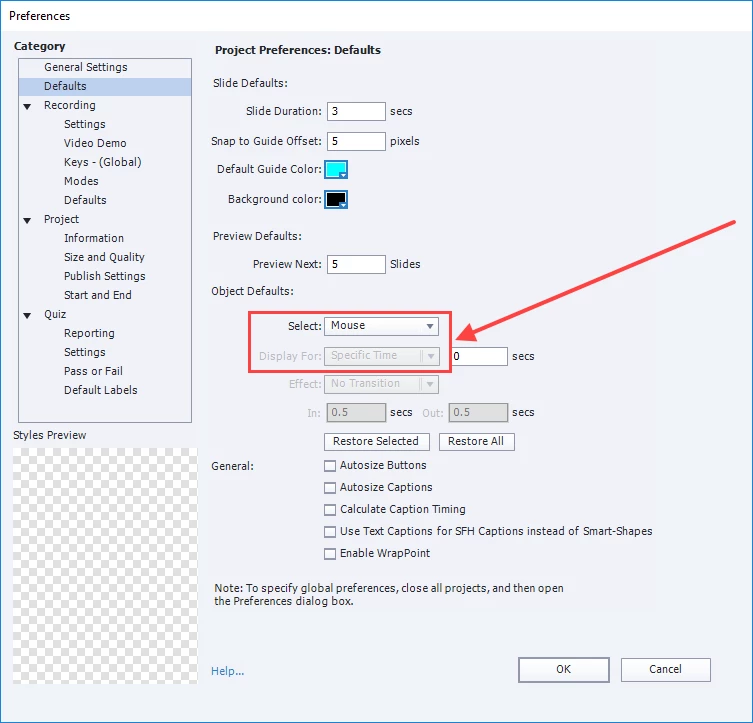
In the Preferences > Defaults > Object Defaults > Select drop-down list, I selected Mouse, so that I could set the mouse to display for the rest of the slide as a default for the project.

How can I change the Display For to "End of Slide"?

As shown in the screenshot here, this option is disabled.
Thank you.

This topic has been closed for replies.

1 reply

RodWard
Community Expert
Community Expert
October 16, 2018

Mouse objects don't work like other screen objects.  If a mouse object is configured to be present on the slide then the mouse is actually visible at all times on that slide.  The mouse object itself is only really configuring the part of the timeline where the mouse MOVES.  So that's why there is no option to time it for Rest of Slide.

ted-thermo
Participating Frequently
October 16, 2018

Thank you for your reply. I have a follow-up question:

On any slide, if I click Objects > Mouse, to add a mouse to the slide, I can go to the Timing panel, and make this same selection. For each slide to which I add a mouse, the Timing for the mouse object defaults to Specific Time. I can change it to Rest of Slide for each slide, as shown in the screenshot here.

However, I was certain there was also a way to set Rest of Slide as a default for the mouse for all slides in the project. This way each time I add a mouse to a slide, the Timing would automatically be set as Rest of Slide, and I would not have to make this selection each time.

Thank you again.

RodWard
Community Expert
Community Expert
October 16, 2018

If you were to set a mouse object to Rest of Slide that would mean that the mouse began to move from the moment the slide timeline began and ended on the last frame of the slide.  In my experience you very rarely ever want it to do that.  Usually you have some time at the start of the slide BEFORE the mouse should move, and you need time AFTER it moves.  This is true especially if you want voiceover on the slide at the same time explaining what is happening.

Mouse objects are usually added when doing slide-by-slide screen capture sessions.  Having a default value of Rest of Slide for any new mouse object added to a slide would mean your screen captures would not accurately reflect at which exact points in the timing that the user executed some mouse movement.  So I can quite understand why this option was left off the defaults for that particular object.