



ArthurTLee
Inspiring
June 28, 2018
Question

Default Quiz Labels Not Updating on Slides

  • June 28, 2018
  • 2 replies
  • 1085 views

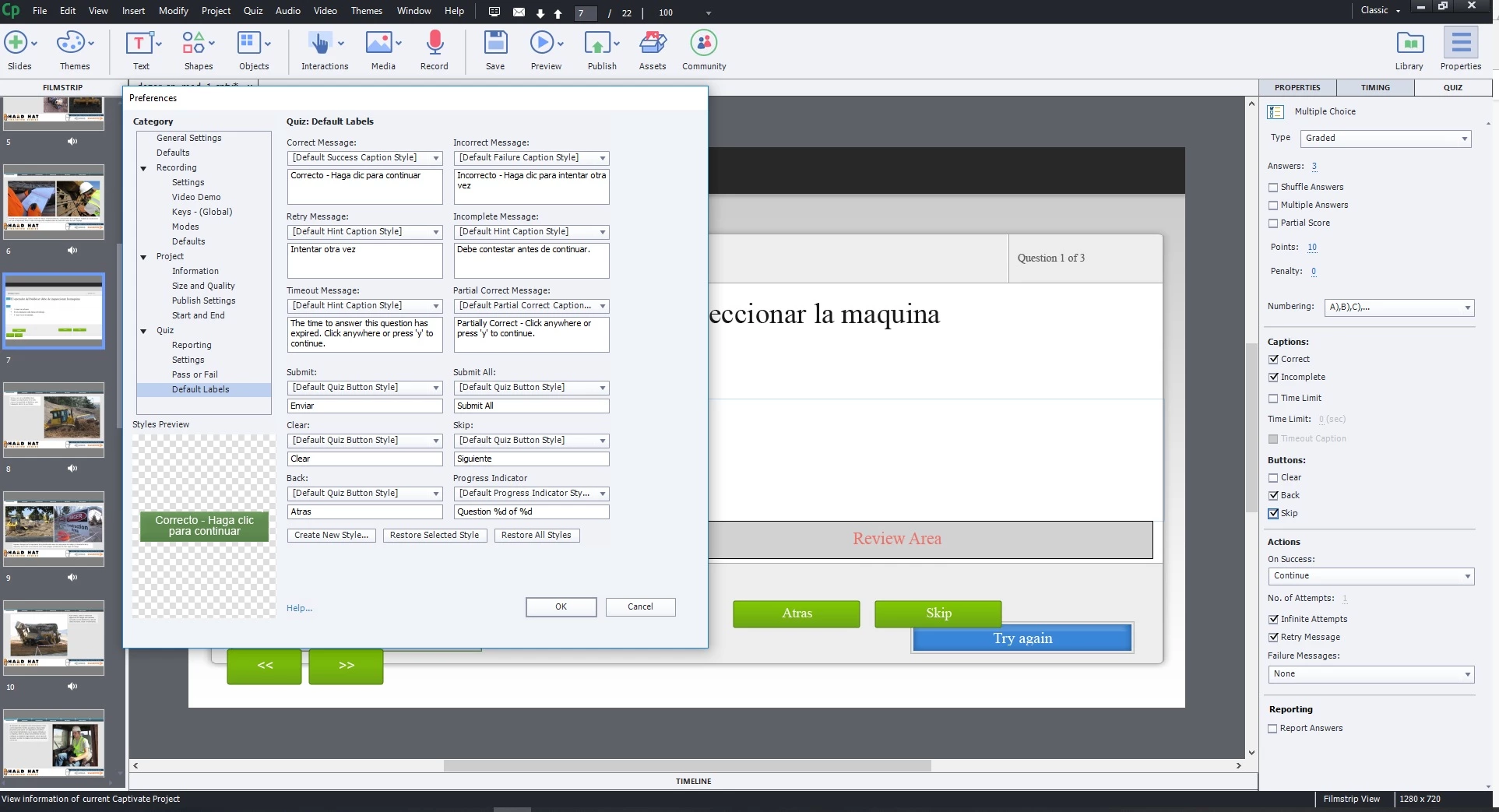
So I am using the latest version of Captivate and am trying to change the default label quiz buttons from "back" and "skip" to their Spanish equivalent. I go to the project info option-->default labels and change the wording accordingly. But when I then go to create quizzes, only the "back" button has changed to its Spanish version. The "skip" button still says "skip" in English. in fact, only the "back" button is showing up the Spanish version. I also had a version of the course that had them all in Spanish, but when I made a copy and saved it, they all reverted back to English. Any thoughts on why this might be?

On top of that, is there not a way to change these for the quiz slides after they have been made? It seems like you should be able to apply a change to all existing quiz slides without having to re-create the quiz slides from scratch.

Thanks,

Arthur
    This topic has been closed for replies.

    2 replies

    Lilybiri
    Legend
    June 29, 2018

    I posted a blog recently on the portal offering some tips for localizing Quiz slides. However after adding a small edit it is still pending for approval. For your sake I also published it now to my personal blog, maybe it can help:

    http://blog.lilybiri.com/tips-to-localize-a-quiz

    It is annoying that you don't see the label changes in the master slides, but they will be done when inserting quiz slides. Since they are part of Preferences, exporting and importing those Preferences in a new project takes care of that localization part at least.

    More annoying is the score slide, because those field labels are not included in the Quiz, Preferences. You can edit them on the Results master slide before creating the quiz. However a master slide is not part of Preferences, but of the theme. This means; saving and reapplying a custom theme. That is OK if you always use the same theme.

    One of my feature requests is to be able to edit labels on the master slide buttons and having the Reset Master slide functional for Quiz slides.

    RodWard
    Community Expert
    Community Expert
    June 29, 2018

    I think you may have found a bug.  The English version of Captivate 2017 seems to display the same behaviour.  Please report this to Adobe using their bug reporting form on the Adobe website.

    In the meantime, the only real way to make these changes to the label text is to select each button and change the label in the Properties tab.

    I suggest you create a CPTX file as a faux 'template' (NOT as a CPTL file) and add one of each type of quiz question into this CPTX file.  Change all the labels as needed.  Then use this file as the starting point for your projects.  Then you can just duplicate the questions you need to use.  This is my process anyway for building courses because I always like to set the questions up in a very specific layout.

    Participating Frequently
    July 18, 2018

    I experienced the same problem. Default label changes aren't showing up after questions have been inserted and you try and change label verbiage afterwards. I reported it to Adobe bug form.

    Lilybiri
    Legend
    July 18, 2018

    If you change the default labels before inserting the quiz slides, they will not show up in the master slides, but they do in the newly inserted quiz slides. Which bug do you mean?