Participating Frequently
November 3, 2015
Answered

Display slide duration inside the slide

  • November 3, 2015
  • 3 replies
  • 2870 views

Hi guys,

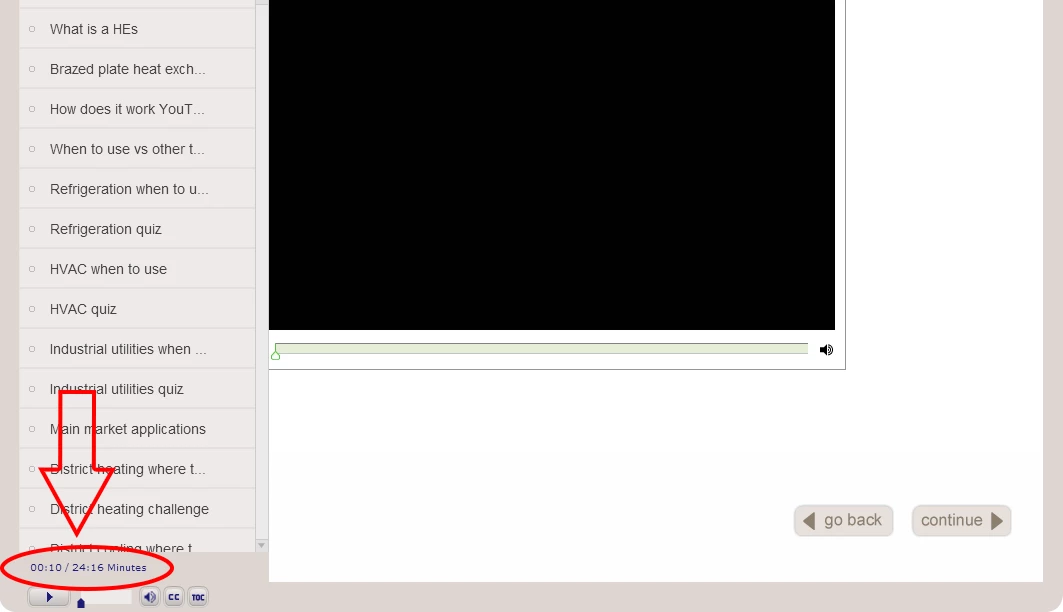
I want to show the slide durion time inside the slide like any text captions or shapes. It was shown bottom of the menu part. How to display inside the slide. Is it possible to show the slide duration in captivate 8.

This topic has been closed for replies.
Correct answer TLCMediaDesign

They are fairly easy to get in HTML5 and SWF with a widget.

The following code inserted in the Head section of the HTML5 index.html will count down the Slide Length and reset with each slide. It populates a user variable myTime in a text caption.

var interfaceObj;
var eventEmitterObj;

window.addEventListener("moduleReadyEvent", function(evt)
{
interfaceObj = evt.Data;
eventEmitterObj = interfaceObj.getEventEmitter();
    initializeEventListeners();
});

function initializeEventListeners()
{
if ( interfaceObj )
{
     if ( eventEmitterObj )
  {
         eventEmitterObj.addEventListener("CPAPI_SLIDEENTER",function(e){  
   setPage();
            });
  }
}
}

function setPage()

gSlide = cp.model.data.project_main.slides;
res = gSlide.split(",");
cSlide = res[window.cpInfoCurrentSlide - 1];
csTo = eval('cp.model.data.'+cSlide+'.to');
csFrom = eval('cp.model.data.'+cSlide+'.from');
csTotal =  csTo - csFrom;
sf = window.cpInfoCurrentFrame;

window.cpAPIEventEmitter.addEventListener("CPAPI_VARIABLEVALUECHANGED",function(){
   runTimer(csTotal, sf, csTo);},"cpInfoCurrentFrame");
}

function runTimer(st, sf, ef)

thisTime = Math.round((st - (window.cpInfoCurrentFrame - sf) - 1) / 30);
mm = Math.floor(thisTime % 3600 / 60);
ss = Math.floor(thisTime % 3600 % 60);
newTime = ((mm > 0 ? (mm < 10 ? "0" : "") + mm + ":" : "00:") + (ss < 10 ? "0" : "") + ss);

window.myTime = String(newTime);

if ( mm == 0 && ss < 1 )
{
  window.cpAPIEventEmitter.removeEventListener("CPAPI_VARIABLEVALUECHANGED",function(){
   runTimer(csTotal, sf, csTo);},"cpInfoCurrentFrame");
}
}

3 replies

Known Participant
December 23, 2015

Thanks! This was VERY helpful! I had figured out a way to hack the info out of the CPM.js script and throw it to some custom scripts I was adding to index.html, but I didn't want to have to edit the CPM file every time.

Here's a modification I have made: instead of displaying the time as numbers, I've created a progress bar graphic for the current slide and modified your script to scale the graphic as the time elapses. Note how I'm referencing the graphic: When published, a graphic inserted in Captivate with an ID of "slProg" becomes a canvas element which I'm referencing with jquery like this: $('canvas[id^=slProg]')[0];

(Tested in IE11 and Chrome)

gSlide = cp.model.data.project_main.slides;

res = gSlide.split(",");

cSlide = res[window.cpInfoCurrentSlide - 1];

csTo = eval('cp.model.data.'+cSlide+'.to');

csFrom = eval('cp.model.data.'+cSlide+'.from');

csTotal =  csTo - csFrom;

sf = window.cpInfoCurrentFrame;

slideDur = csTotal*30;

window.cpAPIEventEmitter.addEventListener("CPAPI_VARIABLEVALUECHANGED",function() {

  runTimer(csTotal, sf, csTo);},"cpInfoCurrentFrame");

}

function runTimer(st, sf, ef) { 

thisTime = Math.round((st - (window.cpInfoCurrentFrame - sf) - 1)*30);

currentTime=slideDur-thisTime;

var slideProg = currentTime/slideDur;

var slProg = $('canvas[id^=slProg]')[0];

slProg.style.transformOrigin = '0% 0%';

slProg.style.webkitTransformOrigin = '0% 0%';

slProg.style.transform = 'scale('+slideProg+', 1)';

slProg.style.webkitTransform = 'scale('+slideProg+', 1)';

if ( thisTime < 1 ) {

  window.cpAPIEventEmitter.removeEventListener("CPAPI_VARIABLEVALUECHANGED",function(){

  runTimer(csTotal, sf, csTo);},"cpInfoCurrentFrame");

}

Known Participant
January 25, 2016

Fun little update: now I have also added a clickable hotspot over my custom progress bar so you can jump around the slide's timeline. Just add this code to the above onEnter script:

/******click to jump timeline*******/

var btn_timeline = $('div[id^=btn_timeline]')[0];

$(btn_timeline).unbind('click');//prevents multiple instances of the click event building up

$(btn_timeline).click(

  function(evt) {

  var x = (evt.pageX - $(btn_timeline).offset().left);//i.e. where on the hotspot did you click

  var clkPcnt = x/$(this).width();//convert that to a percentage

  var jt=sf+Math.round((csTotal*clkPcnt)); //add percentage of duration to start frame

  window.cpAPIInterface.setVariableValue("cpCmndGotoFrameAndResume",jt);

  }

)

And add the hot spot; a transparent button with an ID of "btn_timeline". Position it over the progress bar with the same width. I added an advanced action to mine that resets play and pause button visibility, but otherwise most of its actions are handled by the script.

And note, I'm only publishing HTML5 output, so I have no idea if this does anything in swf output.

TLCMediaDesign
TLCMediaDesignCorrect answer
Inspiring
November 3, 2015

They are fairly easy to get in HTML5 and SWF with a widget.

The following code inserted in the Head section of the HTML5 index.html will count down the Slide Length and reset with each slide. It populates a user variable myTime in a text caption.

var interfaceObj;
var eventEmitterObj;

window.addEventListener("moduleReadyEvent", function(evt)
{
interfaceObj = evt.Data;
eventEmitterObj = interfaceObj.getEventEmitter();
    initializeEventListeners();
});

function initializeEventListeners()
{
if ( interfaceObj )
{
     if ( eventEmitterObj )
  {
         eventEmitterObj.addEventListener("CPAPI_SLIDEENTER",function(e){  
   setPage();
            });
  }
}
}

function setPage()

gSlide = cp.model.data.project_main.slides;
res = gSlide.split(",");
cSlide = res[window.cpInfoCurrentSlide - 1];
csTo = eval('cp.model.data.'+cSlide+'.to');
csFrom = eval('cp.model.data.'+cSlide+'.from');
csTotal =  csTo - csFrom;
sf = window.cpInfoCurrentFrame;

window.cpAPIEventEmitter.addEventListener("CPAPI_VARIABLEVALUECHANGED",function(){
   runTimer(csTotal, sf, csTo);},"cpInfoCurrentFrame");
}

function runTimer(st, sf, ef)

thisTime = Math.round((st - (window.cpInfoCurrentFrame - sf) - 1) / 30);
mm = Math.floor(thisTime % 3600 / 60);
ss = Math.floor(thisTime % 3600 % 60);
newTime = ((mm > 0 ? (mm < 10 ? "0" : "") + mm + ":" : "00:") + (ss < 10 ? "0" : "") + ss);

window.myTime = String(newTime);

if ( mm == 0 && ss < 1 )
{
  window.cpAPIEventEmitter.removeEventListener("CPAPI_VARIABLEVALUECHANGED",function(){
   runTimer(csTotal, sf, csTo);},"cpInfoCurrentFrame");
}
}

Participating Frequently
November 4, 2015

It's working fine thank you !!!!!!!!!!!!!!!!!!!!!!!!!!!!

Lilybiri
Brainiac
November 3, 2015

There are no system variables that have values about total project duration, nor individual slide duration, which makes this not as easy as it seems. It is a pity that those variables are not accessible by the developer, since they clearly exist, showing up in the Table of Contents.

Project duration can be calculated from the system variables cpInfoFrameCount and cpInfoFPS. But have not such an easy workflow for the slide duration.  The time spent on a slide will normally be very different from the slide duration, I don't think it is that important for the learner, but that is my opinion of course.


I can offer you only work flows like described in this (old) blog post:

Display Time information - Captivate blog

Meanwhile I have upgraded the post:

http://blog.lilybiri.com/display-time-cp2019