


Does Captivate 9 allow me to access individual objects imported from PowerPoint slides?
Hi,
I last used Captivate around version 4 or so--so it has been a long time and I am effectively a newbie again. I have a small PowerPoint presentation with a single slide. On this slide, I have a picture of a tabletop, a placemat, a dinner plate, and 6 circle shapes representing drop targets for a planned drag-and-drop interaction. Also on the slide are images of a knife, fork, spoon, napkin, drinking glass, and bread plate (with butter knife). The idea is to ask learners to see if they can "set the table" by dragging these items to the appropriate drop target circles on the tabletop.
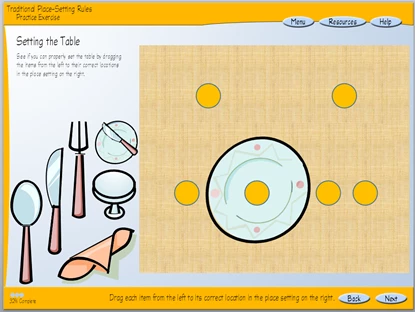
When I import the slide into Captivate 9, it seems like Captivate flattens everything on the original PowerPoint slide, creating a single, non-editable image. The timeline in Captivate does not show any of the individual objects I created in PowerPoint. Further, if I use PowerPoint's Selection Pane to hide (effectively, to turn off) any objects prior to import, Captivate does not seem to honor this and instead displays every object.
My question is, is there any way I can gain access to the individual objects (e.g., the spoon image, or the napkin image) after the slide is imported into Captivate?
Thanks!
-Ray
 AdChoices