Hi there,
As per the current design, 'Auto Submit' works only for correct answers. You can try adding the following advanced action in case if you don't want to report the Drag and Drop interaction.
1. Create a user variable called 'count' with value '0'.
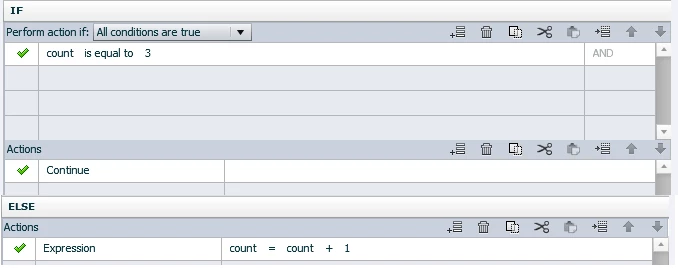
2. Create a conditional action with the following statements.
Assume your total number of Drag sources is 4, and then create a conditional action with the following statements
Select the Target Object, Click on the 'Accept' button from Drag and Drop Properties Panel. (Accepted Drag Source dialog should open up)
Set 'On Drop action' as Execute Advanced action, select the advanced action created in the above step, (set it for all sources).
This action gets triggered while dropping sources and the else part gets executed on drop the last source object and movie continues to the next slide
As I mentioned before, this doesn’t actually submit the question so it won’t work with 'Reporting' scenarios.
Thanks,
Nimmy Sukumaran.



 AdChoices