

New Participant
December 30, 2015
Question

File SCORM Captivate - LMS (SumTotal)

  • December 30, 2015
  • 1 reply
  • 748 views

Hi.

I exported some courses in Captivate 9 as files SCORM 1.2.

I installed the files in LMS SumTotal but it appears this notice:
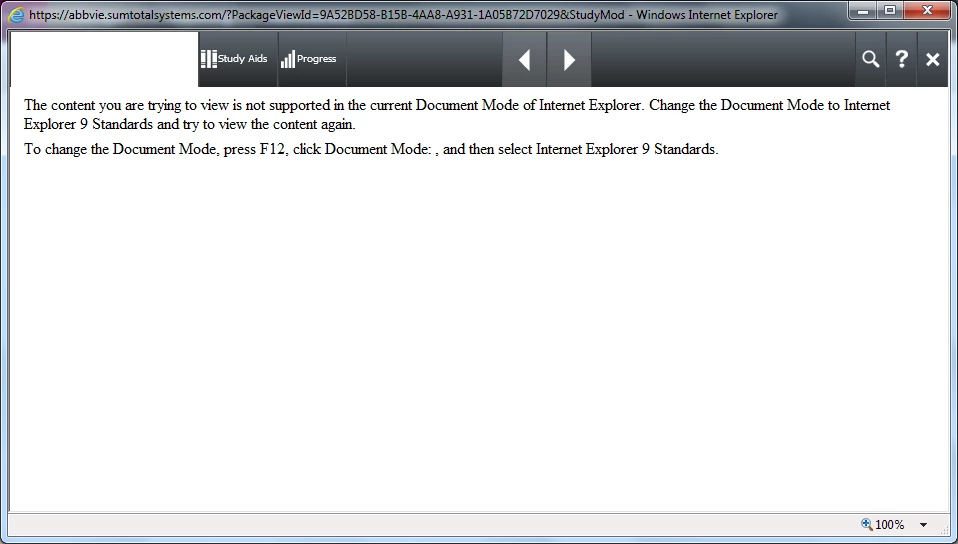

How can i export the files SCORM to make it work in Sumtotal?

This topic has been closed for replies.

1 reply

TLCMediaDesign
Inspiring
December 31, 2015

You'll need to check the Document mode declaration the the scorm index.html file. More than likely it is:

<meta http-equiv="x-ua-compatible" content="IE=10">

You'll need to change it to:

<meta http-equiv="X-UA-Compatible" content="IE=edge">

Depending on the circumstances, your page cannot override the doc mode of the page it is being displayed in, the sumtotal frame your content displays in.

When you find a setting that works you can change the scorm template file so the doc mode is always correct.

New Participant
January 12, 2016

Thanks for responding.

I did this change but my customer still has the same problem.

Is rare because he the opens wiht Internet Explorer 10.

I tried it with Internet Exporer 11 and it worked.

What can I do?

TLCMediaDesign
Inspiring
January 12, 2016

Try removing the meta tag completely. An HTML5 doctype declaration is supposed to automatically use the document mode of the browser.

<!doctype html>

<html>

<head>

<meta charset= "utf-8">