



Dirlo
Inspiring
December 12, 2021
Answered

Format a french decimal number in US

  • December 12, 2021
  • 1 reply
  • 2190 views

...

Hello !...

I'm working on the volumes and try to make an automatic calculator in javascript !
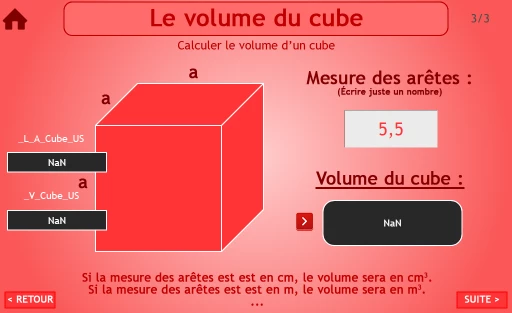
 

The problem is that I can't transform my french number with "," in a US format with "."...

So far (after researches on the net) I try :

1./

var _L_A_Cube_US = _L_A_Cube.toLocaleString("en-US");

var _V_Cube_US = (_L_A_Cube_US * _L_A_Cube_US * _L_A_Cube_US);

var _V_Cube = _V_Cube_US.toLocaleString("fr-FR");


2./

_L_A_Cube_US = _L_A_Cube.replace(' , ' , ' . ');

var _V_Cube_US = (_L_A_Cube_US * _L_A_Cube_US * _L_A_Cube_US);

var _V_Cube = _V_Cube_US.toLocaleString("fr-FR");


3./

_L_A_Cube_US = new Intl.NumberFormat("en-US").format(_L_A_Cube);

var _V_Cube_US = (_L_A_Cube_US * _L_A_Cube_US * _L_A_Cube_US);

var _V_Cube = _V_Cube_US.toLocaleString("fr-FR");


But none of them work as I want...

So, some javascript help is needed !...


Thanks in advance !...

😉

...

    This topic has been closed for replies.
    Correct answer Stagprime2687219

    Hmm...

    I am reminded of the High-Low card game where we ran into a similar problem.

    You may recall the formatting of the numbers issue we worked through.

    In the end - I stripped out the comma, converted to a number (multiply by 1), then - once I got the number I desired after performing calculations, used toLocaleString to get you back to a proper format.

    One of the issues we ran into was that formatting the space in the numbers required stripping the NARROW space versus a normal space.

    Once I realized my comma stripping was working fine, I was able to zero in on the NARROW space.


    Any chance of that going on?


    I played around a bit with this using the concepts from my High-Low Game.

    Give this a shot.

    I used the variables  of  side and  vol - just change them as needed.

    Hope this helps.


    // You could place this onEnter
    function stripComma() {
        side=side.toString();
        side=side.split("");
        for (i=0;i<side.length;++i) {
            if (side[i]==",") {
                side[i]=".";
                --i;
            }
        }
    }
    
    // You can place this code on your button to calculate the volume
    stripComma();
    side=side.join("");
    side=side*1;
    vol = side*side*side;
    vol = vol.toLocaleString(undefined);
    side = side.toLocaleString(undefined);


    1 reply

    Dirlo
    DirloAuthor
    Inspiring
    December 12, 2021

    ...

    I found a solution !... (The example number 2 of my previous post in fact !...)

    I just have to correct the first line with deleting a space !...

    _L_A_Cube_US = _L_A_Cube.replace(' , ', ' . ');

    😉

    ...

    Dirlo
    DirloAuthor
    Inspiring
    December 12, 2021

    ...

    Pffff...

    It's seems to be not as simple...

    If the number is not decimal, the replace function doesn't work (normal !) but returns nothing...

    Still searching so...

    😉

    ...

    TLCMediaDesign
    Inspiring
    December 13, 2021

    The problem is that you are trying to multiply strings, not numbers. That is what toLocaleString does.


    I can't really see how this is all supposed to work, if 5,5 is a product or entered. But you could make that a US number format by doing this,


    var num = "5,5";
    var _num = Number(num.replace(",", "."));