
Participating Frequently
January 27, 2019
Pregunta

Having a couple of issues - first time using in anger

  • January 27, 2019
  • 1 respuesta
  • 368 visualizaciones

Am in the final stages of creating a course (using a trial version at the moment of Captivate 11).

It was originally created by someone else and I have taken it over (been v interesting to say the least).

Two issues that are stumping me:

1.     Have used the glossary Widget and when I run the Project all works fine but when I publish it the glossary does not work and a blank page appears where the glossary should be. I thought it was to do with flashplayer but that is enabled. Am using Windows 10 btw. Any ideas?

2.     The second is all to do with the Quiz Summary template.

a.     Am I right in assuming that that will only display when the quiz has been completed and the slide will not open? This appears to be happening but then I appear to jump to a particular slide but can't work out where that is set.

b. I thought I had managed to edit to capture a pass fail by using
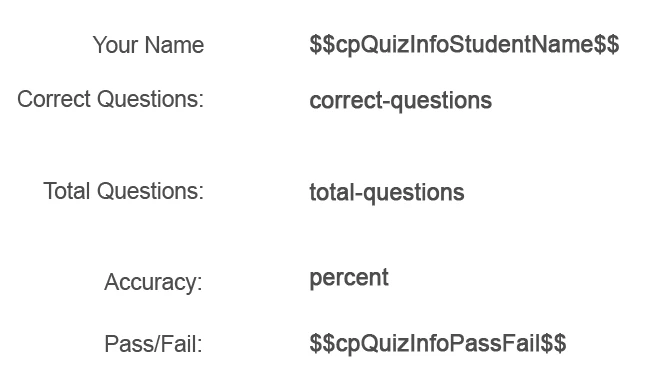
But when quiz has been completed $$cpQuizInfoPassFail$$ returns False

c.     Master Slide has four buttons but previous author has only left 'Continue' - how do I get the others back?? I've looked everywhen but to no avail!!

Anyone have any ideas on these issues?

Thanks in advance Mark U

Este tema ha sido cerrado para respuestas.

1 respuesta

RodWard
Community Expert
Community Expert
January 27, 2019

In answer to your questions:

  1. The Terms and Definitions in the Glossary widget must not contain certain characters otherwise the glossary widget will not appear at runtime.  The usual characters to avoid are anything that might also be used in programming code.  So I recommend you go through the text you have entered into the glossary and remove any punctuation characters other than commas and full stops.  See if it then works.
  2. If the cpQuizInfoPassFail variable returns false it thinks you have failed the quiz.  Completing a quiz is achieved by getting to the end of the quiz.  So check the scoring to see whether enough points were achieved to pass.
Participating Frequently
January 27, 2019

Rod

Have just been through the glossary and removed one set of ' and a : but to no avail. Before I go any further, do these characters include - and / as I have quite a few of these...…. Don't want to go through and find it has no benefit. Do you have by any chance a list of characters not to use?

Cheers

Mark U

Lilybiri
Legend
January 27, 2019

Thanks for the enlightenment on the Quiz Slide - the one I highlighted was a customised version of the default one. It is now a lot clearer as to how the slide works.

As for the Glossary - I'm guessing that it was cutting and pasting into it that has caused the issue. I am now in the process of building a second to eliminate things step by step.

As for my inexperience etc, it's not as bad as I maybe made it sound. I have a solid programming background and I have done a Captivate into and advanced course. I even have two textbooks a) E-Learning Uncovered (Adobe Captivate 2017) and b) Adobe Captivate 2017 - Beyond the Essentials. Although I am now using the 2019 version. I could do with a pointer to a book that you feel is 'the bible'.....

From both answers I think I have enough info to resolve my issues - if not I'll be back soon


Had a lot of experience myself with many software applications and programming langauges. Looking for a bbile, Most books  about Captivate are not good at all. They will  bive you some reicpes (like 'giving a fish') but rarely you will learn 'how to fish'. That was mu conclusino  when haveing screened a lot of books, decided not to buy any. Once I had to use a book in a classroom training for CP, and I used it only to show the bugs in the exercises and workflows. Based on almost 10 years of answering questions daily in all social medai, I summarized wht the most important, typical Captivate stumbling blocks ar. You can judge if you did learn about them in your books and courses:

Challenges for Starters - Captivate blog

Everyone has a personal way of learning. Post as many questions as you want, there are some great experts in all domains here. You met Rod Ward, but there is a great JS expert (if you want o use it in combination with Captivate) as well. They are not authors of books but their answers are based on many years of developing eLearning courses.

For design Captivate is a typical object style based application. You probably know that it means you should avoid to copy/paste formatted text from another application, especially from MS Word for text, because the formatting code is not very.....  Nevertheless combination characters are not supported in the English version for the included Learning interactions (widgets still exist, but they are not compatible with HTML5 output). Confusing, I know.  Here is another link, where you can dowload a table with some information about all the Learning Interactions:

Tips - Learning Interactions - Captivate blog

You are on the most recent version, that is great.  The patch fixed some bugs, but I am used to ask about it because contrary to CC applications updates are not pushed for Captivate.

Good luck! Captivate has a lot of features, it is fun.