Participating Frequently
October 30, 2017
Answered

How do you make it so Users cannot skip Quiz Questions?

  • October 30, 2017
  • 1 reply
  • 354 views

Hi There,


I'm working on a project that includes a quiz (screen shot below). There are play controls at the bottom of the module (that I did not add but seem to be a default) that actually allow the user to skip the quiz questions. I need to it so they can't advance without answering a question, and I don't know how.

  • Should I remove these play controls, in which case how might I do that?
  • Is there a Quiz setting that prevents this?


Capture

This topic has been closed for replies.
Correct answer Lilybiri

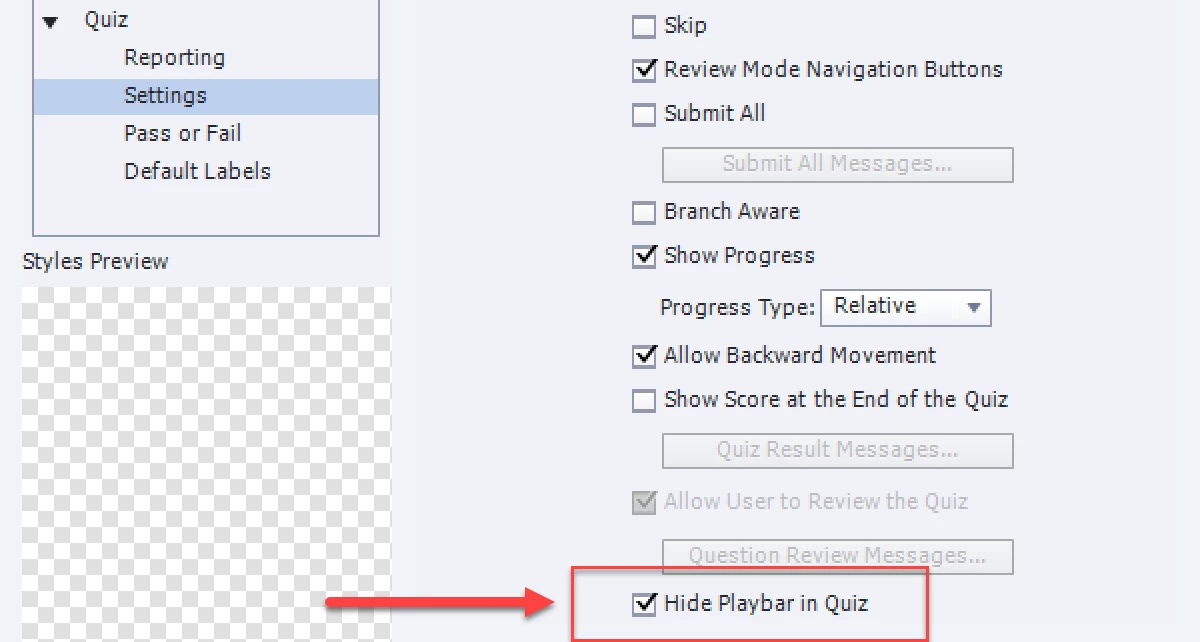
You have to get rid of the playbar on Quiz slides. Use Quiz Preferences, Settings and check the option Hide Playbar

Do not add the Skip button, but that is a default setting.

1 reply

Lilybiri
LilybiriCorrect answer
Brainiac
October 30, 2017

You have to get rid of the playbar on Quiz slides. Use Quiz Preferences, Settings and check the option Hide Playbar

Do not add the Skip button, but that is a default setting.

Participating Frequently
October 31, 2017

Thank you so much!