Brainiac
July 3, 2014
Answered

How to verify that the variable "does not contain" a value?

  • July 3, 2014
  • 1 reply
  • 4685 views

Hi

I am using CP 7.0.1.237.

We want to use Text Area widget for a custom quiz and verify an answer. While we figured out how to verify the existence of certain keywords, we are not able to figure out how to verify that the content should NOT contain certain keywords. For example, we want to ensure that the text entered in this widget should not contain "Transformation" and "Non-compliant".

Is this possible at all?

Thanks

Sreekanth

    This topic has been closed for replies.
    Correct answer Lilybiri

    No, there is no negative equivalent. And on the whole, even for other operators, the negative ones not always work as expected. An combination like you explained is not possible. You probably did see my post about using the TextArea widget for this kind of questions.

    JS will perhaps be the easiest way, but I'm not yet convinced it cannot be done with Advanced actions. Will tell you when I give up. My first idea is to use an extra tracking variable and split up the combined condition in 3 decisions.

    Lieve


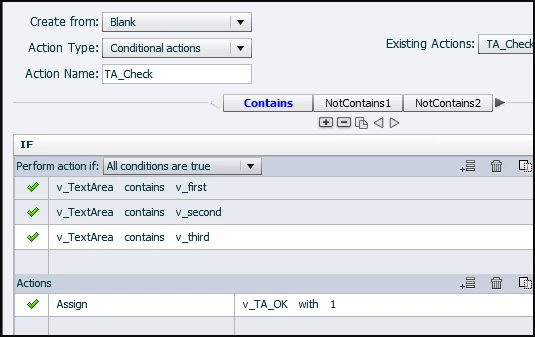
    Sreekanth, it works perfectly. Created this conditional action with 4 decisions. I used the learning interaction Scrolling Text in CP8 (because now you can control the variable - which means I could have a Reset button):

    First decision:
    Second decision (third is similar to this one)
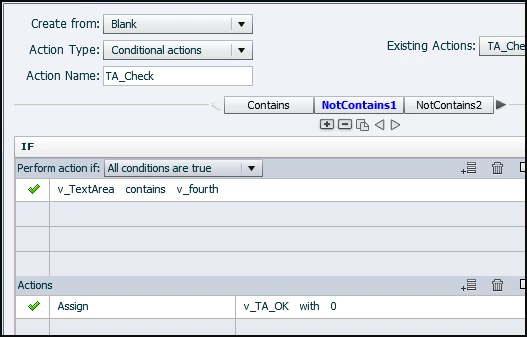
    Fourth and last decision

    I put the words in variables ( v_first ... v_fifth),, that is a reflex I have since I'm using shared actions that much. The associated variable for the TEB (which you can now reset to an empty var in CP8) is v_TextArea and the boolean that will decide if the positive feedback (StarOK) has to be shown is v_TA_OK. If you want to show a negative feedback, put that in the ELSE part of the last decision.

    FYI: it took 15 minutes, including creating assets and variables and testing. Personally I would have needed more time to do it in JS, but that is just me.

    Lieve

    1 reply

    Lilybiri
    Brainiac
    July 3, 2014

    Hello Sreekanth,

    You don't tell what has to happen, but I would just use the ELSE part of a conditional action, and put Continue in the THEN part. It is pretty easy if the condition is not containing 'word1' OR 'word2' with that logic. For a combination with AND I should need bit more time to figure something out if it is possible at all, am still bit sleepy (being not a morning type at all). It will need more decisions in that case. Otherwise you'll need JS. For that combi

    Didn't try out the D&D question of yesterday, had to finish some accountancy (most hated task, always procastrinating).

    Lieve

    RodWard
    Community Expert
    July 3, 2014

    The main problem here is that although Captivate's Conditional Advanced Actions allow you to search for string values using the Contains operator, there is no Does Not Contain equivalent operator.  So you can find words in a variable's string value, but you cannot find words that are missing from it.  At least you can't do so via Advanced Actions.

    As Lieve suggests, you might be wiser to pursue JavaScript for this one.

    Brainiac
    July 3, 2014

    Thanks Rod. Don't have the JS skillset. So, I guess I have to drop the idea of using this type of question for now.

    Sreekanth

