


New Participant
February 3, 2021
Question

HTML5 contains pdf and swf

  • February 3, 2021
  • 2 replies
  • 317 views

We are republishing some of our older Captivate training (SWF) as HTML5.  A few of the modules published with a pdf and some swf files.  This message shows up as they are publishing.
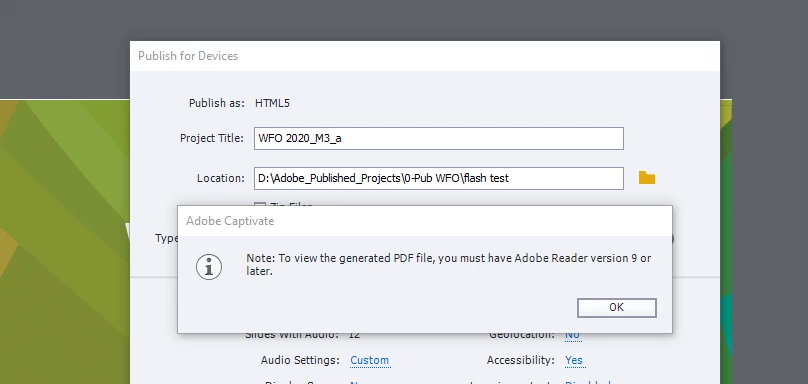
 They of coure won't run in our LMS as it wont connect to Adobe.  I can't figure out where this is comming from and how to stop it.  3 of 7 modules did it today and we have a lot more to republish.  We have been able to copy and paste into a new file for two of them to fix the issue so far but the third may need to be rebuilt.  Any insight would be appreciated.  

    This topic has been closed for replies.

    2 replies

    Lilybiri
    Brainiac
    February 4, 2021

    Are you sure you are publishing ONLY to HTML5? I'm asking this because it looks like there is also publishing to or including interactive pdf, which has died already years before the Flash player.  There may be more incompatible items in your old files which are not compatible with HTML5 output. I have never seen the dialog box you mention since years, but I didn't publish to interactive pdf nor SWF since about 4 years.

    New Participant
    February 4, 2021
    It’s a responsive project using publish to devices. I can’t see any option to publish with swf. Course is text and images. There are some mp4s. Maybe that is the issue. Although one module with video published fine. I have also not seen that message for a long time. We have been using HTML5 for a few years but hadn’t updated all older content. When I open the published zip folder there are swf and PDF files but I see no option in preference or publish window to turn that on (or off!).

    Get Outlook for iOS


    Classification: Protected A
    Lilybiri
    Brainiac
    February 5, 2021
    This is an older project published as swf which we then copied the slides into a new responsive project and then attempted to publish. This new responsive version is publishing with swf and PDF elements.

    Get Outlook for iOS


    Classification: Protected A

    Copy slides from a non-responsive to a responsive project? Fluid boxes or Breakpoints? Just copy/paste cannot create a real responsive project. It may work for one breakpoint in the Breakpoints workflow, but you still have to set up everything with Position Properties and create new styles for text, and edit the lower breakpoints. In a Fluid Boxes project you need to start from scratch, even if you used the convert to Responsive project. The suggested fluid boxes will rarely be fitting, and you need to apply them. Moreover such a project has a lot more limitations than a non-responsive project because objects like Highlight boxes, rollovers, Click boxes are not allowed in normal fluid boxes.

    PDFs normally should be in the callees folder. All SWFs need to be taken out (except for the Learning interactions which will be wrapped in a HTML player on publishing, and the FMR slides which will be converted to mp4 if you are lucky).

    RodWard
    Community Expert
    February 4, 2021

    Multimedia PDFs relied on having an embedded Flash Player.  But, as everyone in the e-learning industry should already be aware, Flash is now no longer supported and from now on Adobe will not be providing any more updates.  Any content you currently have that uses Flash or SWF will need to be republished for HTML5.  PDF is not going to be an option.

    New Participant
    February 4, 2021
    It’s a responsive project using publish to devices. I can’t see any option to publish with swf. Course is text and images. There are some mp4s. Maybe that is the issue. Although one module with video published fine. I have also not seen that message for a long time. We have been using HTML5 for a few years but hadn’t updated all older content. When I open the published zip folder there are swf and PDF files but I see no option in preference or publish window to turn that on (or off!). We aren’t trying to include flash items.

    Get Outlook for iOS


    Classification: Protected A