dianagrasshopper
Known Participant
February 9, 2017
Answered

HTML5 Output - Drag and Drop Interactivity doesn't pause

  • February 9, 2017
  • 1 reply
  • 1489 views

I built a drag and drop interaction in Captivate 9.

I used the standard interaction.

It plays just fine in the standard browser preview, but when I preview in HTML 5, the slide doesn't pause.

After the 3 seconds the slide continues to the next slide.

I have a next button on the slide paused at the end of the timeline.

Has anyone had this issue?

    This topic has been closed for replies.
    Correct answer Lilybiri

    By default a D&D slide is pausing at 1,5 secs. Maybe you should look at this article and download the free pdf I provided:

    How and Why Pause Captivate’s Timeline? | eLearning

    That pause is linked with the Submit button, not visible in the Timeline, but you can se this in the Actions tab of the D&D panel.
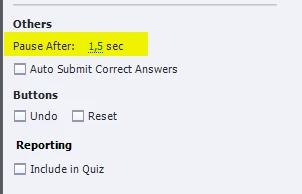
    No need to add another pausing point at all. Did you perhaps delete the Submit button ? You can drag it from the stage in the scratch area, replace it by Auto Submit. Check the pausing in Actions tab, please and don't delete the Submit button.

    When the Submit button is clicked (or Auto Submit, which is only for correct answers), and the answer is correct, the Success action will be done. When the attempts are limited, the Failure action will be done after the last attempt. Both actions are by default set to Continue, but can be changed of course.

    Another reason why the slide is not respecting the pause can be an Object action, where the option 'Continue playing the project' is not unchecked.


    1 reply

    Lilybiri
    LilybiriCorrect answer
    Braniac
    February 9, 2017

    By default a D&D slide is pausing at 1,5 secs. Maybe you should look at this article and download the free pdf I provided:

    How and Why Pause Captivate’s Timeline? | eLearning

    That pause is linked with the Submit button, not visible in the Timeline, but you can se this in the Actions tab of the D&D panel.

    No need to add another pausing point at all. Did you perhaps delete the Submit button ? You can drag it from the stage in the scratch area, replace it by Auto Submit. Check the pausing in Actions tab, please and don't delete the Submit button.

    When the Submit button is clicked (or Auto Submit, which is only for correct answers), and the answer is correct, the Success action will be done. When the attempts are limited, the Failure action will be done after the last attempt. Both actions are by default set to Continue, but can be changed of course.

    Another reason why the slide is not respecting the pause can be an Object action, where the option 'Continue playing the project' is not unchecked.

    dianagrasshopper
    Known Participant
    February 9, 2017

    Yes, I kept the reset button.

    I ended up changing the object action for every drop target.

    For some reason this was only an issue when the output was HTML5. Not an issue otherwise.

    I am all set now.

    Thanks!

    Lilybiri
    Braniac
    February 9, 2017

    Was talking about the Submit, not the Reset button.

    Was it due to the Object actions that did release the playhead?