


Inspiring
January 6, 2016
Question

I need to understand Captivate's file Architecture.

  • January 6, 2016
  • 1 reply
  • 778 views

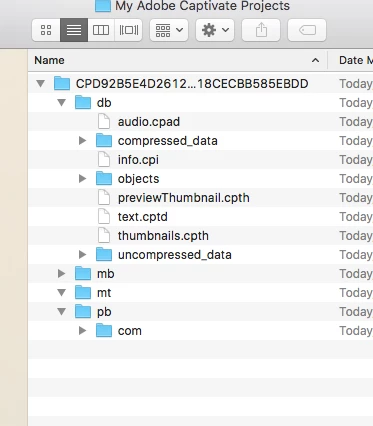
I would appreciate some guidance in understanding the file hierarchy of Adobe Captivate 9. I have years of experience files that go into web design and flash. However, Adobe Captivate is something new. I am adding a screen shot here to show what I see. It's new to me so if someone can help me understand the folders and files and why they do what they do I would appreciate it.

Thank you.
This topic has been closed for replies.

1 reply

AnotherMeAuthor
Inspiring
January 6, 2016

My apology!!!

I Captivate was originally saving my files to my Document folder on my OS X computer. I purposely moved them to my Desktop and went into Captivates preferences and made sure it looked to my Adobe Captivate folder on my desktop to save them. That's where the confusion came in. Although I did this, Captivate is still saving them to my document's folder. Why is this? The screen shot here is the actual screen shot I wanted to embed in my post above. It looks pretty self evident to me. Do the wdgt stand for the widget files that make Captivate interactive? And why are those files for on my desktop? lol

RodWard
Community Expert
Community Expert
January 7, 2016

Your first screen shot is looking at the structure of a project file in the project cache folder.  Don't mess with anything there.  It's where your captivate CPTX is cached while you are actually working on it and performing edits.

The second screenshot relates to the My Captivate Projects folder and the sub folders there are where certain interactions, themes and sample projects are stored.  By default this folder is also where Captivate will try to save new Captivate projects.  But you can actually change this location as needed.  And if you are working in a corporate environment with virtual profiles stored on a LAN then it is advisable to change the Default Locations in Edit > Preferences so that you are always working from your computer hard drive.

AnotherMeAuthor
Inspiring
January 7, 2016

Thanks. Should I put the cache folder in the same folder as my Captivate folder? I moved it to the desktop.

I actually did change where Captivate saves the files. I selected the desktop. But it's still saving it to my Documents directory within OS X El Capitan.