Birch19
Known Participant
April 29, 2019
Answered

Image behavior in Captivate 2017 when published in HTML5

  • April 29, 2019
  • 1 reply
  • 1009 views

I am trying to find a solution to a problem I am seeing when my project is published in HTML5. I do not see this problem when published as a swf. In my project when the learner wishes to view a corresponding job aid step, the learner clicks the job aid button and an image of the job aid step slides in from the right side of the screen for viewing. This in done using a shared advanced action. I have slides in the project which behave as described. The problem I see and this is random in nature, is the job aid image will flash in the final resting spot then animate in from the right. Other than being annoying, this does not cause any navigation issues with the project, just an annoyance. I have tried different ways in my advanced action to enter/show the image but nothing seems to make this any better. Any suggestions will be greatly appreciated.
This topic has been closed for replies.
Correct answer Lilybiri

The version of captivate 2017 I have is 10.0.0.192. I can see about getting the update loaded.

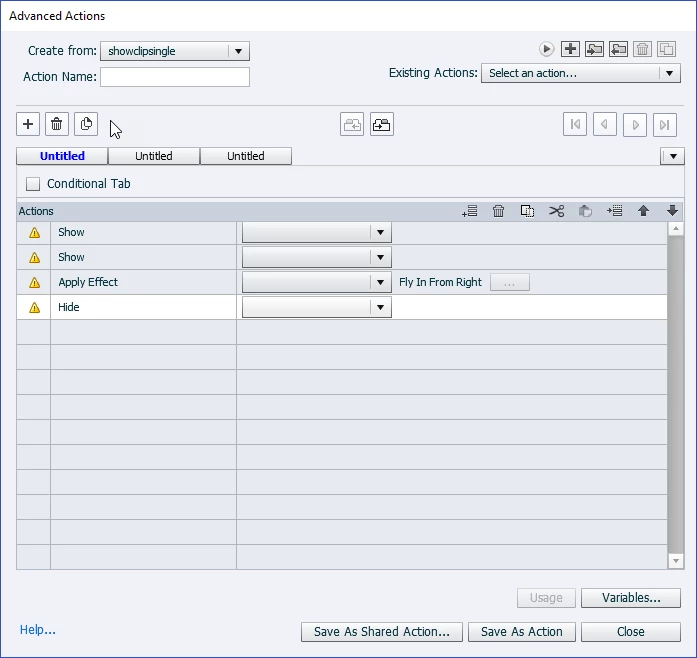
Here is my shared advanced action.

Here is an example of the advanced actions with the object names applied.

Explanation:

Action 1:The job aid (Clip_ja_4) is hidden by default. The learner can choose to view the job aid by clicking the button.

Action 2: The job aid button (clip_btn_4) is hidden by default and is a transparent button. The learner clicks this button to hide the job aid.

Action 3: Animates the job aid (Clip_ja_4) in from the right side of the screen.

Action 4: Hides the primary navigation object (button, TEB, etc...) while the job aid is visible. Using the button made visible in Action 2 will hide the job aid (Action 1), the job aid button (Action 2) and show the primary navigation object hidden in (Action 4)

Again this shared action works for the most part, but flashes the job aid before it animates in from the right on some slides. And to make this more interesting is that the flashing does not happen every time on the same slides. Meaning, it may flash on slide 4 sometimes and sometimes slide 4 will not flash.


I know that it is inconsistent, has to do with loading time. Tried to explain that before.

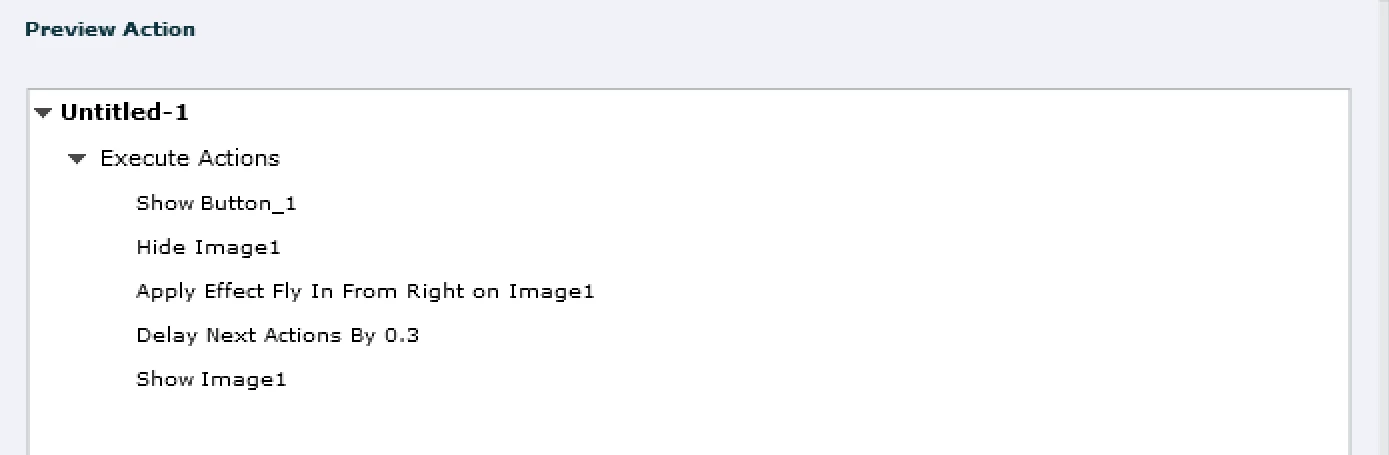
Fly in has a motion path starting from outside the stage. Having the image outside is not helping for the flickering (mes escuses,Le Dirio). Suggested solution could certainly be a solution by using the Delay Next actions before showing the image to which the effect is applied. The effect's default duration is 2 seconds, so this could be a solution:

You keep the same parameters. No need to define the delay time as parameter.

If you need many of those actions on the same slide, I could offer an alternative with a multistate object. You would need only one button in that case to close the popup.

1 reply

Dirlo
Inspiring
April 29, 2019

...

Hello !

I do like this in advanced action :

- Hide the image

- Apply the effect

- Delay the next action (Then the time selected depends on your time effect)

- Show the image

...

Birch19
Birch19Author
Known Participant
April 29, 2019

Thanks for the response, however if the image is hidden when applying the effect, there would be no sense in the effect. The learner would not see it. If I am reading the suggested advanced action correctly.

The randomness of this same shared advanced action working on some slides and not others is what has me scratching my head.

Birch19
Birch19Author
Known Participant
April 30, 2019

I know that it is inconsistent, has to do with loading time. Tried to explain that before.

Fly in has a motion path starting from outside the stage. Having the image outside is not helping for the flickering (mes escuses,Le Dirio). Suggested solution could certainly be a solution by using the Delay Next actions before showing the image to which the effect is applied. The effect's default duration is 2 seconds, so this could be a solution:

You keep the same parameters. No need to define the delay time as parameter.

If you need many of those actions on the same slide, I could offer an alternative with a multistate object. You would need only one button in that case to close the popup.


Added the delay to the project and the images are now displaying as designed.

Thanks Lilybiri and Li Dori.. for the assistance

Have a great day!