


Known Participant
April 12, 2011
Question

Issues recording audio during a screen capture demo

  • April 12, 2011
  • 1 reply
  • 1912 views

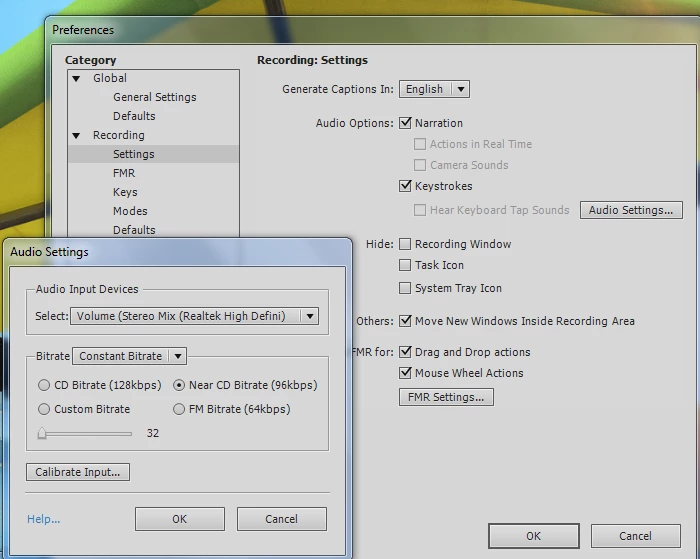
I'm working on a computer with a Windows 7 OS and Captivate 5. I have "stereo mix" enabled as default recording device.(Realtek high definition audio).My task at hand involves demonstrating a video captioning tool, so I need to be recording the video's audio as I step through the process of creating the captions in a web based environment. I must admit that what I am trying to accomplish works easily with other screen capture tools (even free tools) but I would really like to be able use Captivate 5 for this project and others upcoming that require the same functionality. As a last resort, I've also tried adjusting the audio settings within the project (selecting the "narration" option as shown) but I'm not having any luck getting the results I need. I'm really hoping that it's something simple I'm just missing, and that  forum experts can nudge me in the right direction... Thanks very much for your input.
    This topic has been closed for replies.

    1 reply

    RodWard
    Community Expert
    April 12, 2011

    I've read your post a couple of times but I'm still not quite sure exactly what "results" it is that you aren't having any luck getting.  Can you be a bit more specific?

    In general, if you're only using a single microphone to record your voiceover, stereo is going to be overkill and will just make your filesize grow for no real benefit.  Mono will result in a smaller published filesize overall.

    Having used Captivate for many years, I would say that the workflow is rarely more efficient recording as you capture.  That might be the way you would approach capturing with something like Camtasia, but Captivate's strength is that you have so many post editing options.  So I tend to find it easier just to quickly capture the screens I need, and then go back in afterward and work out what I want to say about those screens, recording my voiceover AFTER I've weeded out the slides I don't need.

    Known Participant
    April 12, 2011

    I'm sorry I wasn't clear, I'll elaborate....  In this particular case, I'm showing faculty how to easily caption (for accessibility/508 compliance) their existing online  video content using a web based tool. I would like to record  a YouTube video with it's own audio as I demo the captioning of that audio. I  can get the video, but Captivate won't record the audio and I can't figure out why...thanks for your input.  I'm hoping the solution is something simple that I've twisted round or forgotten...

    RodWard
    Community Expert
    April 12, 2011

    So, just to clarify, you don't have any problems with Captivate recording your own voiceover using a microphone plugged into your PC, it's just that Captivate isn't picking up the audio channel of the video that is being played on the web page you're capturing.

    You want Captivate to record the sound from the video file as well as your own voiceover. Is that the issue?