


Known Participant
May 20, 2020
Answered

Issues with Captivate 2019 Project published to HTML5

  • May 20, 2020
  • 3 replies
  • 975 views

Hi


I have published a project to HTML5 and loaded it into our LMS. On some slides the audio is not playing and on others there is a delay in the audio statting. I removed the Scaleable html cthinking this could be the issue but its doing the same thing. If I use the TOC to select a topic - I have to click it a good few times before the audio will start to play. 


I do have some FMR slides in the project which play fine eventhough the HTML5 tracker advises that they are not supported. Could this be the issue? Any advice will be appreciated. Please advise thanks 
    This topic has been closed for replies.
    Correct answer Lilybiri

    FMR slides will be converted to MP4, but indeed, sometimes they lead to issues. However I don't think this is linked with your audio problems.

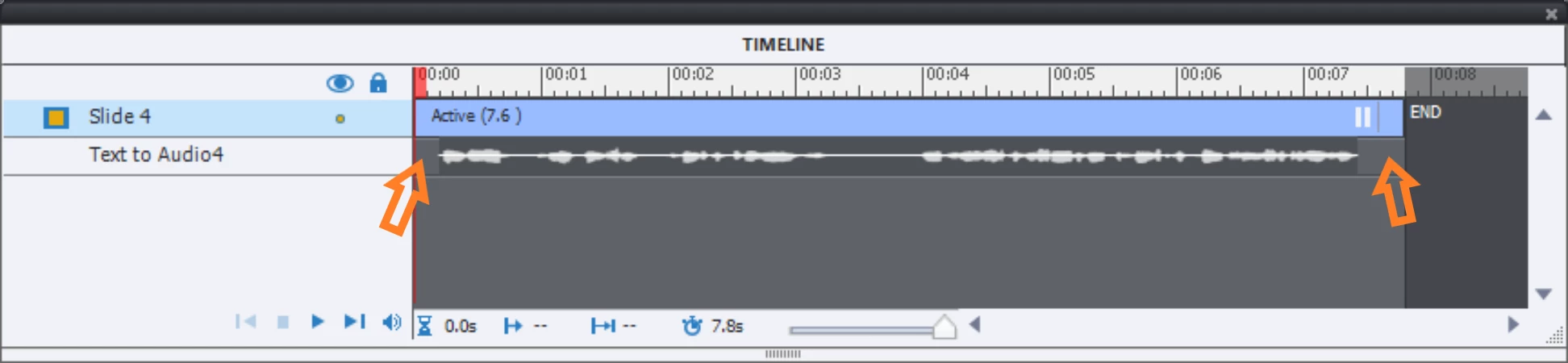
    Did you leave a gap  befor and after the audio timelines in each slide?

    If you don't have that, maybe Captivate sees all the audio files as one large project file, and that indeed may lead to synchronisation issues.

    3 replies

    fremo101Author
    Known Participant
    May 20, 2020

    Hi Lilybiri - I do have two hidden slides but this slide is just a normal slide.

    Lilybiri
    Brainiac
    May 20, 2020

    Drag the hidden slides to the bottom of the Filmstrip and Refresh the TOC. 

    fremo101Author
    Known Participant
    May 20, 2020

    Will I lose all my TOC labels if I reset or is refresh somewhere else

    fremo101Author
    Known Participant
    May 20, 2020

    Thank you Lilybiri - just to confirm I need to move the audio to start a second after the slide? Or will a silence at the start of the audio be ok?

    Lilybiri
    Brainiac
    May 20, 2020

    Did you not see the screenshot I psoted? Silence in the audio clip will not help, will be cut by CP. You need to move the audio timeline as I showed, but not for a second, may be less. I usualy have something between 0,1 and 0,5secsn depending on the weight of the audio clip

    Lilybiri
    LilybiriCorrect answer
    Brainiac
    May 20, 2020

    FMR slides will be converted to MP4, but indeed, sometimes they lead to issues. However I don't think this is linked with your audio problems.

    Did you leave a gap  befor and after the audio timelines in each slide?

    If you don't have that, maybe Captivate sees all the audio files as one large project file, and that indeed may lead to synchronisation issues.

    fremo101Author
    Known Participant
    May 28, 2020

    Thank you Lilybiri - placing a space at the start of audio did resolve the audio issues.