


bernadettewnek
Known Participant
November 8, 2019
Question

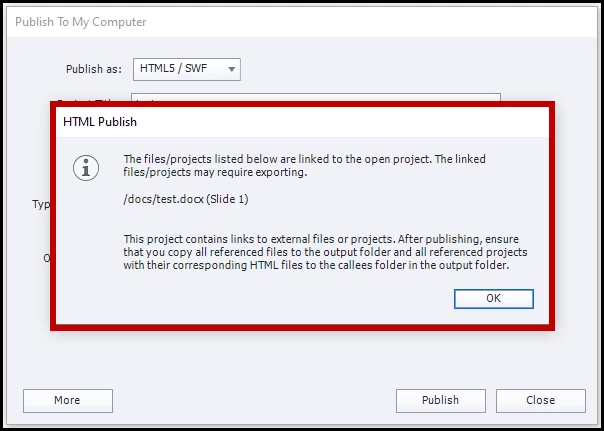
List of external resources dialog box when publishing

  • November 8, 2019
  • 1 reply
  • 220 views

Hi All,

In Captivate 2017, whenever I published a project that had links to an external resource (such as a Word document that would open in a new window, for example), Captivate would show me a list of all those resources when I published. (See screenshot below.) I loved this feature because it was like a checklist for me to make sure I included these files in the output folder.


I don't get this list when I use Captivate 2019. Is this some option I need to turn on? Or was this removed in this version of Captivate?
 

Thanks,

Bernadette

This topic has been closed for replies.

1 reply

Lilybiri
Legend
November 8, 2019

Were you formerly publishing to SWF, now to HTML5? There is a warning when exporting to HTML, telling you to add those external files to the callees folder/

bernadettewnek
Known Participant
November 8, 2019

Hi Lieve,

In both cases, I was publishing to HTML5.

I have both 2017 and 2019 on my desktop and followed the exact same steps on both versions. I received the dialog on the 2017 version, but not 2019.

Thanks,

Bernadette

Lilybiri
Legend
November 9, 2019

Too bad, do not have CP2017 anymore. Maybe you should launch a bug report to get it back.