


muchelleb
Inspiring
March 13, 2018
Question

LMS Recording Quiz Answers, Not Saving Progress

  • March 13, 2018
  • 2 replies
  • 2865 views

Hi,

I wanted to reach out to see if anyone else has had experience with an issue like this or similar.

A few of our employees have completed a few sections of an eLearning module in our LMS. They exited out of the eLearning with the intention to return later and finish it up. When they re-opened the eLearning, it took them back to the very start so that they had to redo everything (no variables were saved).

Hundreds of other employees haven't had this issue and progress seems to have saved.

I ran a detailed SCORM report and can see that the employees HAVE answered a number of quiz questions within the eLearning - so they definitely have made progress.

It seems as if their quiz progress is being reported back to the LMS - however their place isn't being saved in the eLearning.

Does anyone have experience with this kind of issue or something similar? I can't replicate the issue myself.

The SCORM was originally a SCORM 1.2. Could this be the cause?

Any thoughts would be so appreciated.

Here are my reporting preferences:
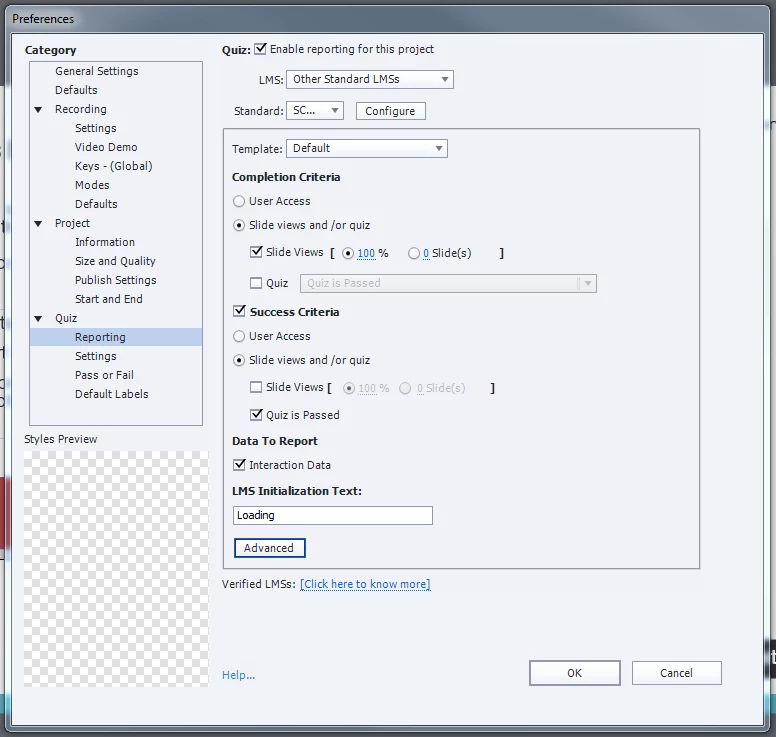
Michelle

This topic has been closed for replies.

2 replies

muchelleb
muchellebAuthor
Inspiring
March 15, 2018

Thanks Rod. I have since changed the course to SCORM 2004, so hopefully I'll see better results using that version of SCORM.

Michelle

RodWard
Community Expert
March 15, 2018

If you continue to experience issues with the same users, I would suggest you may need to investigate either their particular PCs or the browsers they may be using.  Resume Data should be fed back to the browser from the LMS when the user reopens their browser for the next session on the same learning module.  If the Resume Data is not getting picked up by their system, either the user is doing something odd that breaks the SCORM API connection with the LMS during their session, or else there is some security restriction in place at their end that prevents the Resume Data from getting through.

RodWard
Community Expert
March 15, 2018

Thanks Rod.

It's strange because the quiz data is obviously being sent to the LMS - but for whatever reason the resume data isn't in these instances. More reports are coming in that users places aren't being saved - however they may be users that started the eLearning when it was still SCORM 1.2.

I'm also having weird cases where the LMS doesn't even register that her person has started the course, but in the background ALL of the quiz data can be pulled to show that that person has fully finished the eLearning program.

It's all a bit weird.

Hoping that SCORM 2004 is the answer to my prayers.

Michelle


OK.  This is sounding now more like you may have a significant issue either with your own network, or with the LMS.

Give SCORM 2004 a go for sure, but if that doesn't resolve the issue, you're going to have to get the LMS technicians involved in tracking down the source of this issue.  DO NOT let the LMS people fob you off with answers that blame Captivate.  That's their standard response.  But in my experience, 99 times out of 100 the issue will be the LMS.

Lilybiri
Brainiac
March 13, 2018

What is the setting for 'Never Send Resume Data' under the Advanced button?

muchelleb
muchellebAuthor
Inspiring
March 13, 2018

Hi Lily,

This is the settings under the Advanced button.

I've just run a detailed SCORM report (below) and I can see that the person has answered every quiz question (with a point marking of ten) and pressed BOTH buttons at the end of the eLearning (with a point marking of 1)

Any expertise you could offer would be so appreciated.

Lilybiri
Brainiac
March 14, 2018

Sorry, I still do not see the dialog box under the Advanced button in your first screenshot (Quiz, Reporting)