Participating Frequently
June 21, 2021
Question

LMS Shows Course is Still in Progress After Completion

  • June 21, 2021
  • 5 replies
  • 2669 views

Greetings, community. I have been troubleshooting a Captivate file a vendor built for us, so far to no avail, and I wanted to reach out and ask if anyone out there can help.


Some set-up information:


  • This course was created in Captivate 9.
  • It contains two knowledge questions that give the user one attempt.
  • There is no quiz.
  • There is an Exit button on the last slide set to exit the course when the learner clicks it.


My company loaded the course into our LMS for testing. We ran into this problem:


When a user takes the course all the way through and exits the course, the activity details on the subsequent summary page show the course as completed, meaning the user finished the course by navigating through all the pages. However, upon exiting the system, the course results show it’s still in progress; it appears there is an element missing in Captivate that won’t allow the course to get to that final step of fully closing out. The system still thinks the course is in progress, and it will not generate a completion certificate.


We have other LMS courses without quizzes that successfully exit, generate a transcript and show a system status of complete, so I’m not sure why this would be different, unless having KC slides makes a difference.


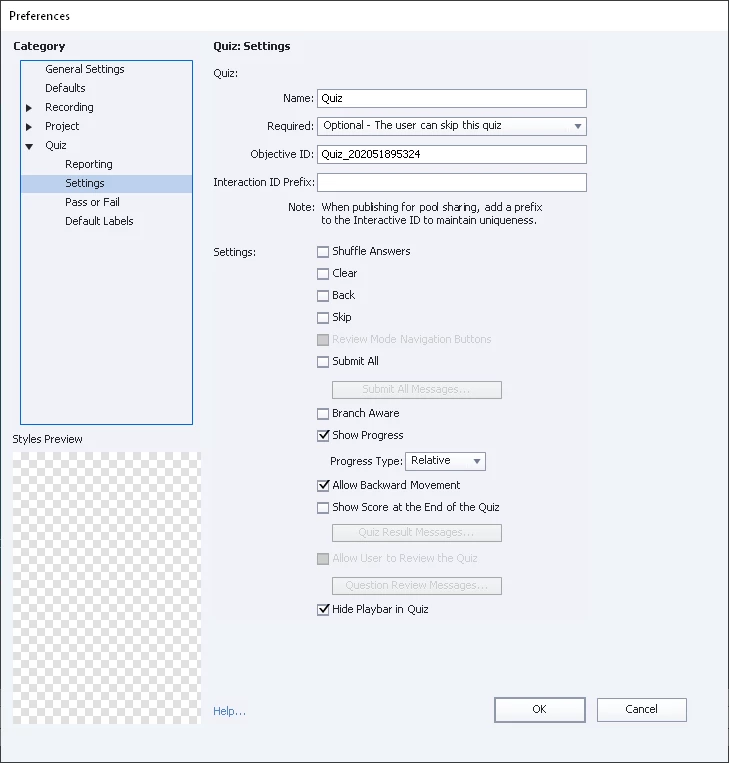
So far, our vendor hasn’t identified what’s behind this issue. I tried doing some troubleshooting, and I found that even though no quiz slides were in this problem course, the original developer had checked “Show Score at End of Quiz” in settings, and there was a corresponding Quiz Results slide toward the end of the course, so I removed the results slide, which unchecked the “Show Score at End of Quiz” box.


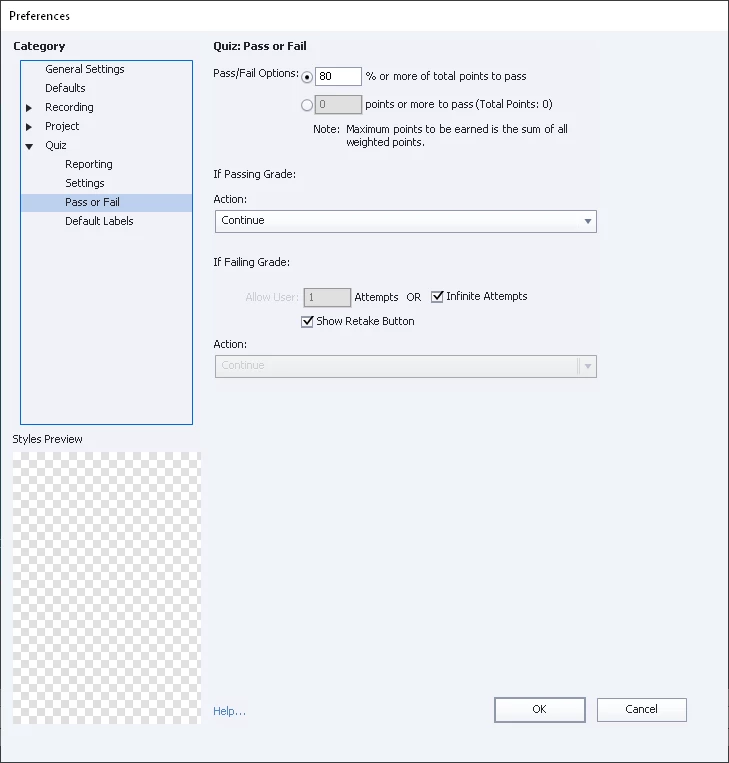
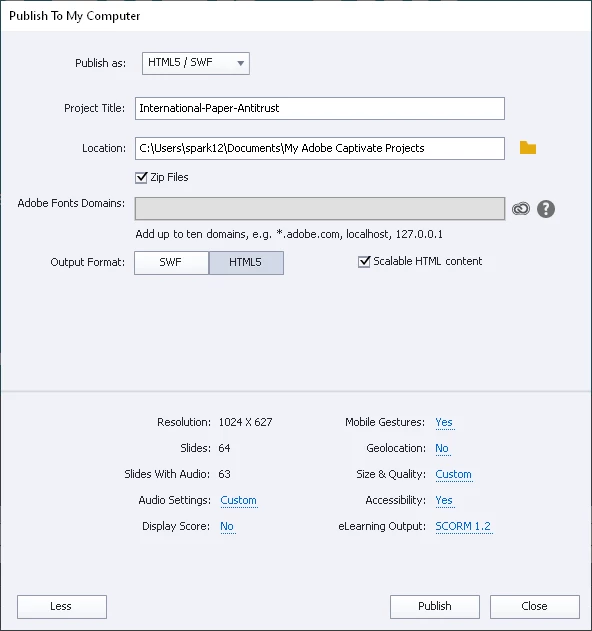
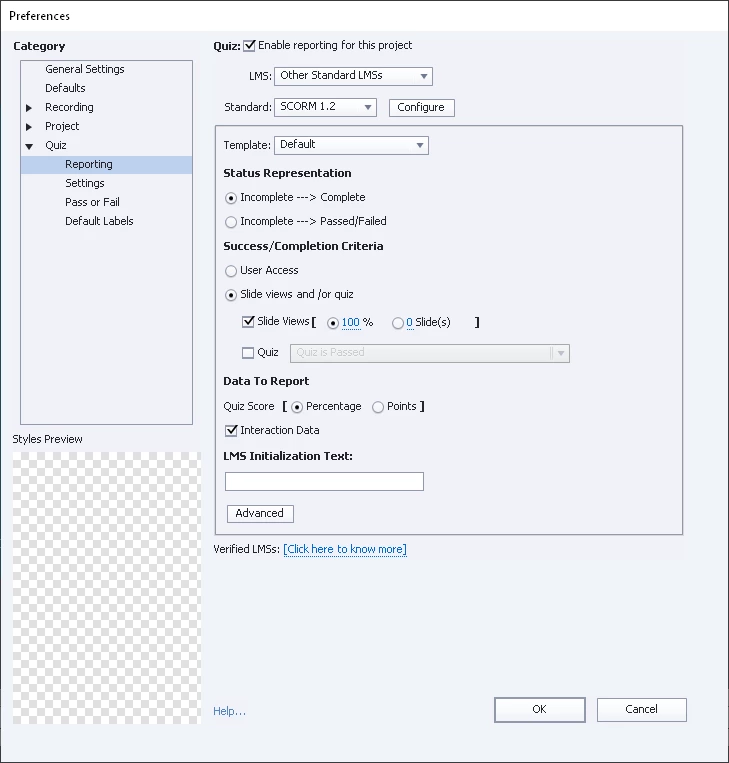
We tested the course again with the same results. I’m including screenshots of quiz settings. These are not the vendor's original settings, as they reflect where I unchecked "Show Score at end of Quiz" box.


Any thoughts as to what we are overlooking?


This topic has been closed for replies.

5 replies

Participating Frequently
July 8, 2021

Greetings, community. We finally found the issue behind this problem, and it was, in fact, in our LMS settings, which specified an 80% passing score (our default) for the user to complete the course. Because the course was unscored, this setting confused the system. Our LMS team removed the passing score requirement, and everything worked after that. Many thanks for all the suggestions and observations that propelled us along the path of investigating this issue. I have learned a lot through this process.

Lilybiri
Legend
July 8, 2021

Thanks for the heads up!

Paul Wilson CTDP
Community Expert
Community Expert
June 25, 2021

Have you reached out to the LMS vendor to see if they have other clients who use content created with Adobe Captivate? It might be worth an email or a phone call. Also, ask if they have compatibility with other versions of SCORM. You may get different results with SCORM 2004 or possibly xAPI.

Paul Wilson, CTDP
Participating Frequently
June 28, 2021

Thank you all for your recommendations and support. Here's an update with status and comments on this still-unresolved issue:

  • Our vendor has been doing LMS testing in the SCORM cloud but so far cannot replicate the issue, as it seems the course is working properly in all their tests. So that makes them think, understandably, that our LMS is the culprit.
  • However, we do have other unscored Captivate courses that run on our company's LMS, and they properly close out, show a completed status and issue transcripts for users. So, although we remain open to any possibility, we are, for now, doubtful that our LMS is the culprit.
  • The only difference between the unscored Captivate courses that DO work properly on our LMS and this problematic unscored course is that this course has two KC slides, and the others have no KC slides. Will that make a difference?
  • I have forwarded to our vendor Lilybiri's suggestion to put a score on the Exit button on the last slide. If scoring is, after all, part of the issue, that sounds like an easy, efficient fix.

I will post another update when we have done some more testing.

Lilybiri
Legend
June 28, 2021

Since it is OK on SCORM Cloud, to me it seems to be a LMS problem. By default a KC slide is not transmitting any data to the LMS, there is no score, it is not included in a Quiz, they are reset immediately when leaving the slide, which is the same situation as when the Retake button would be clicked for scored quiz slides. Apparently your LMS has issues with those KC slides. 

Participant
June 23, 2021

Yeah I'll guess it's the quiz results slide keeping the user from that 100%. I always set the percentage required at about 90% or so, depending on how many slides are in the course overall. 

Lilybiri
Legend
June 23, 2021

But you deleted the quiz slide, at least that is what I understood from your previous answers. 

Participating Frequently
June 23, 2021

Lillybiri, that's right - the screenshots from my original post reflect settings after I deleted the Quiz Results slide.


However, after reading initial suggestions yesterday from you, Paul and Rod, I went back to the original vendor file, which did include the Quiz Results slide. I copied the file, leaving everything as is, including the Quiz Results slide, except that I lowered the slide view requirement, then I published it and sent the modified SCORM package to be loaded into our LMS. Once it’s ready, I’ll test it again with just that modification in place. If the LMS completion issue persists, I’ll try something else. Our vendor is also working on troubleshooting the course.


I want to thank you for the articles you’ve referred me to. As always, your thorough, step-by-step explanations and real-world examples offer much-needed clarification and instruction. I was not aware of the Advanced Interaction panel, and I found it quite the eye-opening discovery. In this particular case, the “Total: 0 Points” shown in the Advanced Interaction panel, even with all filters selected, confirms this file has no scored objects. From what I understand, this means I can delete the Quiz Results slide after all without negative repercussions. However, since I did delete it once before, and doing so did not resolve the completion issue, I assume that’s not a critical step toward finding the solution this course needs. What do you think?

RodWard
Community Expert
Community Expert
June 22, 2021

The FIRST thing to do when having problems with any LMS is to upload the same SCORM module to SCORM Cloud and see whether you experience the same issue there.  If SCORM Cloud can mark your SCO as complete with its current settings then so should your own LMS.


It could be that your LMS is expecting a score of some kind before it will mark the module as complete and since you only have KC questions that don't report a score, the LMS feels something is missing.  You can test if this assumption is correct by simply adding a TrueFalse question with a score (any score will do) and then test this version of your module in your LMS.  If the LMS then marks your module complete with only the addition of a score, then that's where the problem was.


If the Quiz Results slide has been added to a project then you cannot really delete it after that.  You can only Hide it so that it does not appear visible after publishing.

Paul Wilson CTDP
Community Expert
Community Expert
June 21, 2021

I would try hiding or deleting the results slide, especially if users are going to get to that slide. That might be preventing the course from completing. Alternatively, you could lower the percentage of slides that need to be viewed in order to complete the course. For example, if you had 64 slides and four of them were optional that learners could potentially not view you might want to change the settings from Slide Views 100% to Slide Views 60 Slides.


Paul Wilson, CTDP
Lilybiri
Legend
June 22, 2021

I wonder if the requirement of 100% slide views can be the culprit? Are you sure that all slides will always have been visited? From other users I heard that some LMSs require to visit each slide completely, up till the last frame? I don't know how you set up the KC slides, did you keep the default Success action set to Continue or did you edit it to Go to Next Slide? In the last case the learner never visits the frames after the pausing point on that slide.

An easy solution could be to attach a score to the Exit button, and require a 100% passing score, which would mean that the learner will only get completion if that Exit button has been clicked. You can still hide the score slide for the learners. 


BTW it is IMPOSSIBLE to delete the score slide if there is at least one scored object. There are many reasons why you can only hide it. Here is one example:

http://blog.lilybiri.com/secret-of-hidden-score-slide

In this case it was possible to delete it because apparently there was no scored object. However that shouldn't be important for this issue.


Participating Frequently
June 22, 2021

Thank you, Paul, Lillybiri and Rod. I am grateful to have guidance from the experts. I'm going to try a couple of  things based on your feedback, and I'll test the update on our LMS before reporting back on what worked (or didn't) for the benefit of the community. I think the first thing to try is to lower the "100%" of the slide view requirement, since if that is the problem, that will be an easy fix. 


To answer Lillybiri's question: Our vendor set up the two KC slides with the action-on-success of "Continue."


After reading Lillybiri's article on hidden score slides and comments from all of you, do I understand correctly that I should not delete the quiz results slide, even if there is no scored object in the course, because I am not sure when the vendor added it?