


Participating Frequently
July 29, 2021
Question

Loading square appears in all slide breaks in my published video

  • July 29, 2021
  • 1 reply
  • 305 views

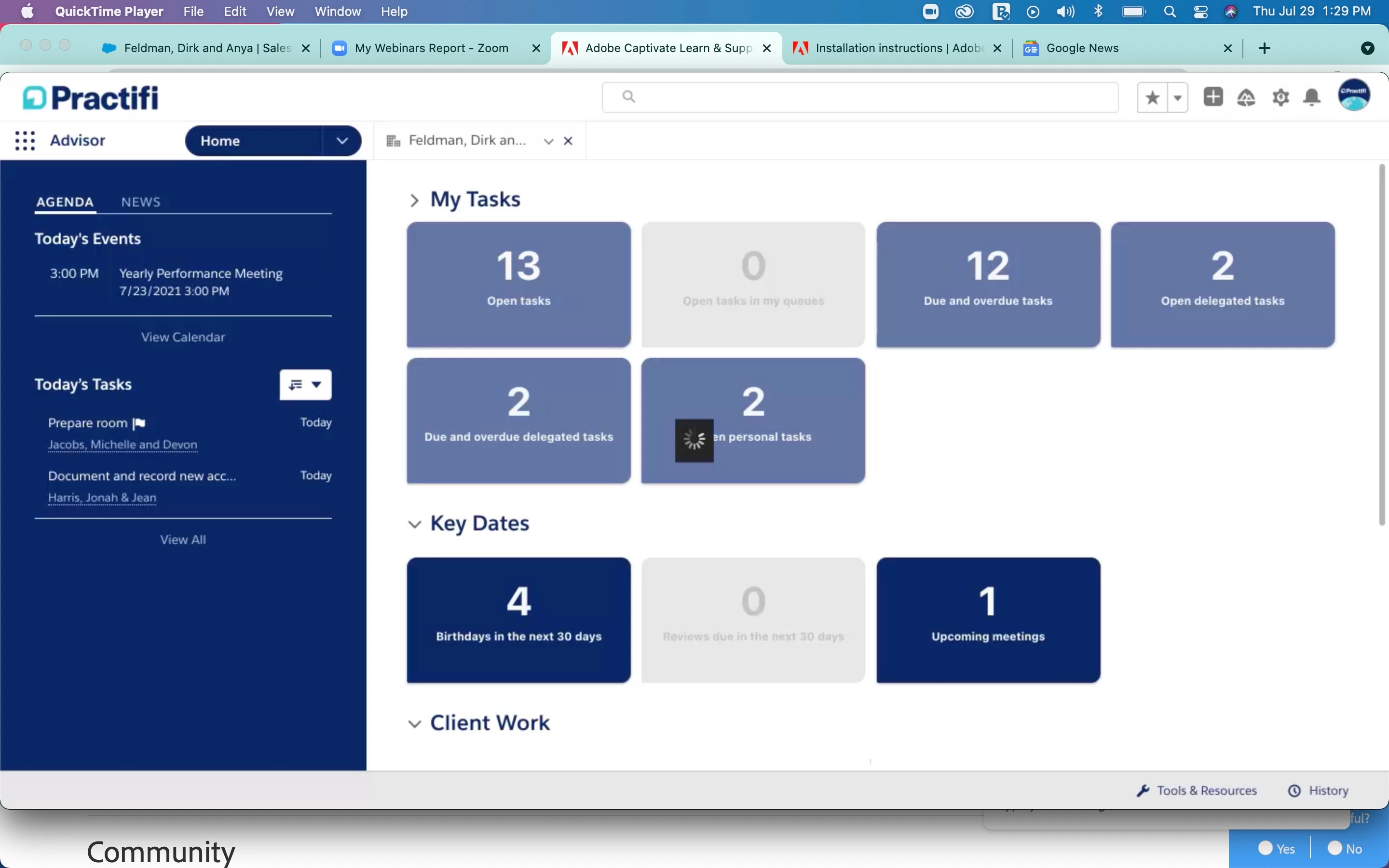
I'm sure this is some setting that I've built incorrectly, but in my published video I see a small black loading square at every Video Demo slide break (see attached). Does anyone know how to get rid of these?


Thanks!
 

This topic has been closed for replies.

1 reply

RodWard
Community Expert
Community Expert
July 30, 2021

That looks like the Loading GIF animation.  It just means that the video needs to be downloaded before it can start playing.  You will usually only see this animation play for any more than a split second if your bandwidth is somewhat lacking. 


Once the video has been downloaded once to your browser cache it should usually load immediately if you replay the slide again.  Does it do that for you? 


If the loading animation persists for the same time each and evey time you play the slide then the issue might be latency in your web server.  If you suspect that the issue is your server, try uploading the same module to another web server with better bandwidth.  SCORM Cloud is always a good testing sandpit to use.

Participating Frequently
August 19, 2021

Thanks for the extra information here! We actually aren't viewing these in our web browsers, but downloading them and viewing via the Quicktime tool. The loading boxes appear even weeks after export/download, so I don't think it's related to bandwidth issues.

Not sure if it makes a difference, but we download these as .mp4 videos each time. Might we have a different experience if we export as an HTML5/SWF file?

RodWard
Community Expert
Community Expert
August 20, 2021

OK.  Well if you have published the project out as MP4 video then the loading animation that you are seeing is baked into the video file. It has nothing to do with bandwidth in that case because you are not downloading a different video file each time you get to a new slide.  If you are viewing the video locally on your system and still seeing the loading animation, it must be displaying as a part of the video itself.  I have not personally seen this problem before so I don't have a solution for you.


If you publish the same project to HTML5 (forget the SWF) then certain assets still get downloaded as you get to each slide.  For example, if you have a video or animation placed on a given slide, then the first time you get to that slide the media file will need to be downloaded from the web server and you will likely see a brief loading animation before it starts playing.  But the second time you visit the same slide it should load almost immediately because it is cached in the browser.


If you are using QuickTime to view the files, that makes me think perhaps you are on a Mac.  Is that correct?  If so, try to get a colleague using Windows to view the same file to see if they have the same experience.  If you published to Video from a Captivate on a Mac, try publishing from a Windows box instead to see if the same loading animations appear in the export.