


cgokul
Inspiring
January 1, 2015
Answered

Master Slide - Likert - Error shown in picture

  • January 1, 2015
  • 1 reply
  • 567 views

I'm currently, creating a new master slide. I'm changing the positions of quiz slide elements in all 3 views. I used the blank theme as the base and then started making changes to the master slide. All quiz slides are working perfectly except one. Problem is with likert slide in the master slides. When working in the primary view, there isn't any problem. Moment i switch to tablet view, the following happens.
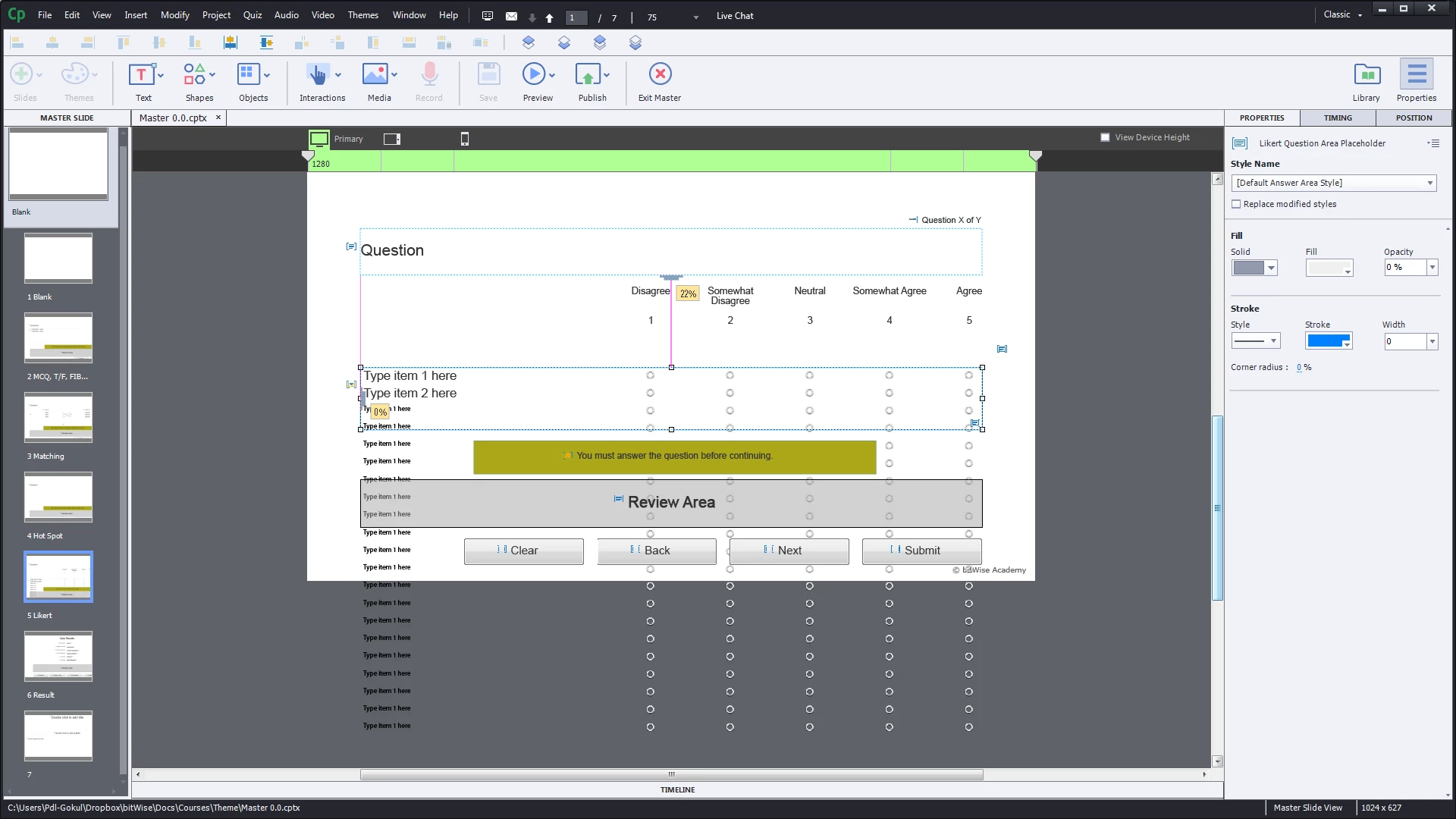
I have tried to remove the multiple items but there seems to be no way for it. Also, it heavily slows captivate and I'm forced to restart captivate. But the multiple entries still persist. Again when I try to do changes the likert master slide, captivate slows down.


Possible solution I have tried already: I have already deleted this slide and copy pasted a new likert slide from a new project with blank theme. Again, everything works as long as I stick with the primary view. Moment, I click on the tablet view, the multiple entries appear and the same cycle again.


Has anyone got any clue as to why this is happening only with likert slide? How can I avoid it? Thanks in advance for your time.

This topic has been closed for replies.
Correct answer RodWard

OK.  You've convinced me.  This must be a bug.  I suggest you report it to Adobe and avoid the Likert question type for the moment until they fix it.

1 reply

RodWard
Adobe Expert
January 1, 2015

If you're talking about the fact that half of your answer options are disappearing off into the scrap area then the simple answer is that you should NOT use so many answers.  Captivate slides are not scrolling areas.  So you have to fit everything inside the available area.  I would recommend you redesign your question slide.

Also, since you are using Likert questions, please remember that these are NOT going to report a score to your quiz, because Likert's don't have a correct or incorrect answer.

cgokul
cgokulAuthor
Inspiring
January 1, 2015

RodWard, I think maybe I should have provided more context and also I think the picture isnt too clear.

  1. I did not add extra questions at all. The only ones I want are the 2 default items which appear in larger font.
  2. The remaining are all the exact same phrase of item one which is "Type item 1 here" in mobile view font type. This is repeated again and again and there seems to be no way to remove it.

Let me add the exact look I have in primary here before I switch to the tablet view.

Now when I click on the tablet view, the following happens.

Again if I go to primary view, the following happens.

Next when I click on mobile view.

Now at this point, the software gets sluggish. So I restart and go to master slide view and select the Likert Slide again. This is what is see.

Obviously, this view isnt looking good. So If i start editing and if I go between the views, its the whole story all over again. Sorry for the elaborate steps but I just wanted to make it clear.

RodWard
RodWardCorrect answer
Adobe Expert
January 1, 2015

OK.  You've convinced me.  This must be a bug.  I suggest you report it to Adobe and avoid the Likert question type for the moment until they fix it.