


Participating Frequently
April 26, 2024
Answered

Not able to create new File - Captivate 12.3.0.12

  • April 26, 2024
  • 2 replies
  • 462 views

After installing the new version of Captivate, I am not able to create a new file anymore.

It gets an infinit loading screen, without any chance to continue.


Nevertheless I am still able to load existing Files, which gives me an workaround using an empty save file and start working there.


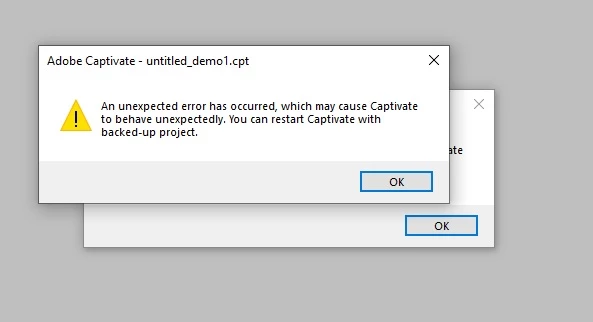
Unfortunately it breaks the entire Software Simulation Tool. I can do the screenrecording, but the moment I press 'end' and it tries to put it in Captivate an error occurs. (attached)


Thanks in advance for any advice!


    This topic has been closed for replies.
    Correct answer Lilybiri

    How do you clean the Preferences: find the subfolder 'utils' under the installation folder, and run the CleanPreferences... file appropriate for your OS. Captivate needs to be closed.

    For software simulations a workaround is to install Captivate Classic along the new version and use the software simulation in that application.. It has more possibilities and will not automatically be responsive.

    2 replies

    Lilybiri
    LilybiriCorrect answer
    Legend
    April 29, 2024

    How do you clean the Preferences: find the subfolder 'utils' under the installation folder, and run the CleanPreferences... file appropriate for your OS. Captivate needs to be closed.

    For software simulations a workaround is to install Captivate Classic along the new version and use the software simulation in that application.. It has more possibilities and will not automatically be responsive.

    Participating Frequently
    April 29, 2024

    Thanks for help. Did work and everything works now!. Thanks a lot!

    Community Manager
    April 29, 2024

    Hi ClaudioTwo,


    Please confirm if you are using Windows or MAC?


    Can you try to reset the preferences for Captivate and try again?

    Participating Frequently
    April 29, 2024

    Thanks for the advice - I am using Windows. Together with the Input of Lilybiri it did work. Fantastic, thanks!