Known Participant
April 19, 2017
Answered

Over-State in Button-Quiz - Impossible?

  • April 19, 2017
  • 1 reply
  • 1112 views

To make it short: Is it possible to set - or simulate with a workaround - different states in the buttons within a quiz?
Adobe self says "no" (Adobe Captivate – Hilfe | Objekte mit mehreren Status (german "Schaltflachen für Fragenfolien und Drag and Drop unterstützen keine Status.")).

It just looks a little bit non-profesional if all buttons have over-states but not the one in the quiz. And I just want to be sure that there is no way to fix this "per hand".

    This topic has been closed for replies.
    Correct answer Lilybiri

    replace the present quiz buttons by image buttons (those have three images associated with names ending on _up, _over, _down)

    I did already so as shown in your screenshot (or on the masters). The problem is that they seem to have only one state. Thought that image-buttons in Captivate 8 have only one.

    The big problem with those is that you'll need a trio of images for each quiz button because there is no way to change the button label it has to be in the image.

    To make a trio of graphics including the label for the states is not the/my problem. My problem is where the images for "over" and "up" (with the endings you tell above) have to be stored or defined. I see only one state, even in your Screenshot.
    This counts for Captivate 8, will look at Captivate 9 on my other job tomorrow ...


    Here in Flanders I would say "Ongelovige Thomas"

    Of course you don't know me but believe me when I say that I never post an answer that I have not double-checked. Most regular visitors of this forum or my blog are aware of that.

    Those old image buttons have very strict rules concerning names. Look in the Gallery, and you'll see that each of those buttons always has 3 images:
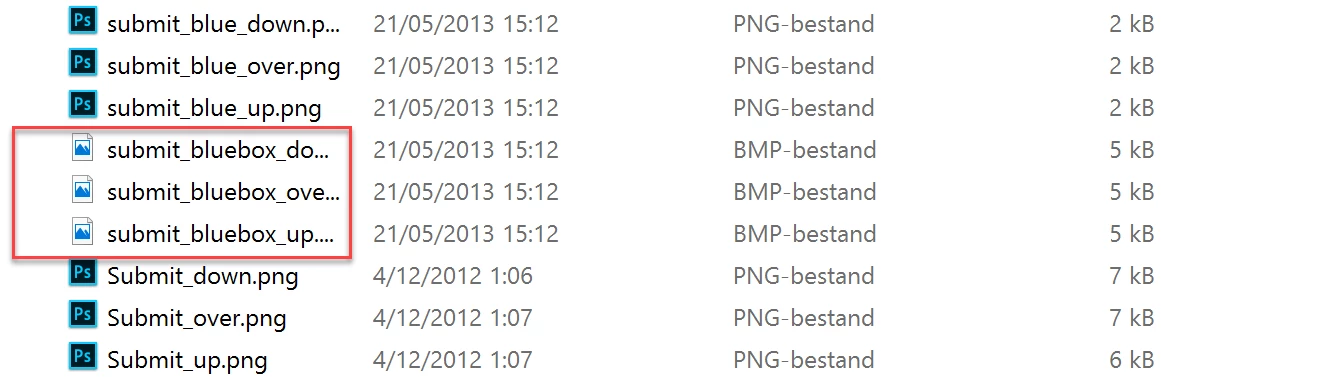
    In the dropdown list, where you choose another button (OSM or on the slide) you'll see only one of the images. When you have selected that one, Captivate is intelligent enough to find the other states - which are images -  of that button. I have examples on my blog of custom image buttons as well. Here is one example:

    Playtime with Audio and Widgets - Captivate blog

    Since shape buttons appeared I rarely use those image buttons, too cumbersome to create them (Using Photoshop and assets export, they have to be bitmap).


    1 reply

    Lilybiri
    Brainiac
    April 19, 2017

    In Captivate 9 (you don't tell the version you use) the only type of button that can show a rollover and down state as embedded button on quiz/score slides is the Image Button. The transparant button nor the system button, although they have InBuilt states will show those states on Quiz slides.

    In Captivate 2017 the Transparent button will also show rollover and down state on Quiz and Score slides.

    Too bad that it is still not possible to use shape buttons on quiz/score slides as embedded buttons.

    Known Participant
    April 19, 2017

    You are right, I forgot to tell the used version. For older projects on one job I still use Captivate 8 (and there in this case forms with image as fill for buttons outside the quizz and image-buttons without states for the system-buttons within the quiz) , for another job Captivate 9 (no need for using individualized buttons till today)
    So let's wait till work with Captivate 2017 ... and thanks for the answer. Just thought "perhaps there is a way" ...

    Inspiring
    April 19, 2017

    replace the present quiz buttons by image buttons (those have three images associated with names ending on _up, _over, _down)

    I did already so as shown in your screenshot (or on the masters). The problem is that they seem to have only one state. Thought that image-buttons in Captivate 8 have only one.

    The big problem with those is that you'll need a trio of images for each quiz button because there is no way to change the button label it has to be in the image.

    To make a trio of graphics including the label for the states is not the/my problem. My problem is where the images for "over" and "up" (with the endings you tell above) have to be stored or defined. I see only one state, even in your Screenshot.
    This counts for Captivate 8, will look at Captivate 9 on my other job tomorrow ...


    Hi,

    On your question: "where the images for "over" and "up" (with the endings you tell above) have to be stored or defined": should be stored within Gallery/Buttons folder:

    Maybe this will help you.

    PB
