


Inspiring
January 6, 2017
Answered

Pass and Fail event dont seem to be triggering..

  • January 6, 2017
  • 4 replies
  • 737 views

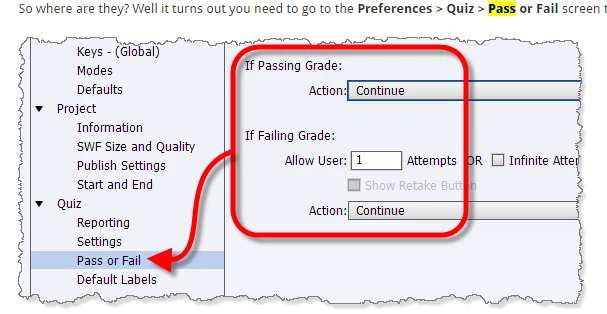
I'll steal a graphic from Rod Ward's Infosemantics blog to give you some context...

I have two advanced actions that are supposed to be triggered when the user enters the results slide -- one on passing grade , and one on failing grade. For some reason it seems the event is not triggering.   The advanced action should show shapes on the result slide and hide others.  It should also log to the browser console and its not doing that..

Any reason why the advanced actions would not be called?

Thanks!

I use Captivate 9.
This topic has been closed for replies.
Correct answer Lilybiri

Misunderstanding? The actions you point at in the screenshot are triggered when clicking the Continue buitton on the score slide. I explained that functionality in:

Question Question Slides in Captivate - Captivate blog

If you want to have something happening On Entering the score slide, you need to use a conditional action triggered by the On Enter event. You can use the system variable cpQuizInfoPassFail (it is a Boolean) to create that action.

4 replies

Inspiring
January 12, 2017

Hi Lilybiri,

Ok. Thank you.

yea, I change the name of my project all of the time... the name is usually something like "CurrentState20170112", so I pretty much have a copy of the project for every day I work on it. 

You said "you can delete the Review area on the Master Results slide, because that is the location where the messages appear..."  Does this always mean if I have nothing in the Failure / Success boxes (in the image above), and neither of them are checked, I can delete this Review area?  I love deleting things I don't need to keep things tidy.  : )

Lilybiri
Brainiac
January 12, 2017

I tend to be more cautious about Quiz and Score slides. When I replace feedback messages on the score slide I will make that Review area 'invisible', not delete it: make it very small, set FIll Alpha to 0, no stroke, etc. Be careful: you will also lose the appearance of the Success message. It was just another idea because you told that the old Failure message continues to appear, which  I couldn't reproduce. Those are old posts, but I described several tweaking possibilities for Quiz and Score slide:

Question Question Slides in Captivate - Captivate blog

Question Question Slides - Part 2 - Captivate blog

Inspiring
January 16, 2017

Hallo Lieve,

You mentioned above that the actions that you set in the "pre settings" for pass and not pass are triggered when the user hits the continue button on the results slide.  Thanks for the tip. 

I was looking at that today with a fresh project and I noticed they dont show up immediately after the user hits "continue", but a good couple seconds afterwards.

Is it more accurate to say they show up on "slide end" after the user hits "continue"?

Thanks again.

Inspiring
January 12, 2017

Hallo Lilybiri,

I gave up trying this in Captivate and moved the logic to my javascript file which I don't like doing anymore because none of my colleagues can make changes to the project if I am not here.

I can say this, however:  Although, I removed  Failure Message from my presettings, it was still showing up, and what I had on my time line, was not.

It seems Captivate stored what I originally wanted to do "on failure" - ie show the message that I had in the box in the image above - and refused to listen to any changes I tried to make afterwards.

Lilybiri
Brainiac
January 12, 2017

That is very strange, did you clear the cache once after storing a backup?

I double-checked the action to be triggered as I told, which means something is indeed going awry. You could also have saved the project under a different name and try to publish that one?

What you are showing in the last screenshot is just the wording of the original Failure/Success message which appear on the score slide. By unchecking those, you didn't delete the message at all. If you want to be totally sure that it is no longer showing up, you'll have to create a custom Success message as well, which means editing the conditional action, adding a decision for Succes. Then you can delete the Review area on the Master Results slide, because that is the location where the messages appear. I still find it very strange that it is not working for you but since you switched to JS your issue is solved.

Inspiring
January 6, 2017

@Lilybiri

Hello.  I think you mentioned that you can read German.  Here's your test ; )  Do you have any idea why this OnEnter advanced action would not be working...

Fail_Try_Again is not showing on failed 1st attempt..

Lilybiri
Brainiac
January 6, 2017

Can you show the full action? Use the Preview button, looks like a play button, in the top control panel of the Advanced actions dialog box.

I just double-checked, created two hidden feedback messages (one for first, one for second Failure on Quiz level), grouped them and this Conditional action On Enter of the score slide works perfect:

I always use numbers, not false/true for Booleans but that cannot be the cause of your action not working.

Lilybiri
LilybiriCorrect answer
Brainiac
January 6, 2017

Misunderstanding? The actions you point at in the screenshot are triggered when clicking the Continue buitton on the score slide. I explained that functionality in:

Question Question Slides in Captivate - Captivate blog

If you want to have something happening On Entering the score slide, you need to use a conditional action triggered by the On Enter event. You can use the system variable cpQuizInfoPassFail (it is a Boolean) to create that action.

Inspiring
January 6, 2017

Thanks!  I thought they were triggered on slide enter.

Lilybiri
Brainiac
January 6, 2017

You need to read that blog post, although I should upgrade some features for CP9.