subassapkota
Known Participant
May 14, 2020
Question

position the custom motion effect applied image where it was left off when revisiting same slide

  • May 14, 2020
  • 1 reply
  • 661 views

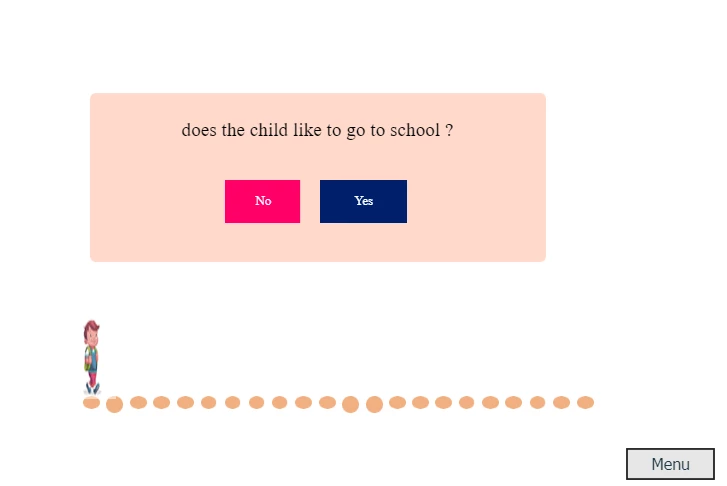
I am working on a slide that involves a series of questions. The user has to answer Yes or No to the question. there is an image of a child that moves one step further if the user answers  Yes to the question and does not move if answered No

screenshot:


I am moving this image by creating a custom motion effect that moves the image one step further. here is the detail in this blog.

http://blog.lilybiri.com/how-to-use-custom-effect-in-actions 

And creating an advanced action to the Yes button that applies that effect and moves it one step further.


I achieved this by Lilybiri's answer here. 


This works well here is my problem.


The menu button in the slide takes the user to the custom Table of content slide. suppose the user in the 8th question which means the image is 8th step forward. if the user goes to the table of the content slide and returns to the same slide, the slide will resume from where it was left off. I did this with reading blogs on Micro-navigation.  But the image of a child does not in the step where it was left off.


Everything is fine but the image comes to the first step that is the problem.


I think there is some possibility to solve this possible. 


Thank you.


    This topic has been closed for replies.

    1 reply

    Lilybiri
    Brainiac
    May 14, 2020

    Effects are reset automatically when you leave the slide and re-enter it. You didn't mention in the first quesstion that this could happen.

    In that case it is not a good idea to use motion effects. I would replace it by a multistate object, where the image moves one step further in each step (will be without visible movement). You can use shortcut keys to do so: SHIFT-Right key will move the image 10px to the right (you can find those shortcut keys also on my blog). You'll need as many states as you have steps.

    Instead of applying the custom effect with an advanced action, you'll use the 'Go to Next State' command on a correct question. Make sure that you activate the option 'Retain state when....' in the Properties panel of the multistate object.

    Read here:

    http://blog.lilybiri.com/about-state-commands-and-a-progress-bar

    You talk about micro-navigation, one of the words I invented almost 10 years ago. What are you using it for?

    subassapkota
    Known Participant
    May 15, 2020

    Thank you Lilybiri. I will be looking into it. I used Micro-navigation to resume the slide from where it was left off by using for eg, rdcmndGotoFrameAndResume variables.

    Lilybiri
    Brainiac
    May 15, 2020

    That variable has been deprecated with version 6 if my memory is correct.  Found in a very old article? 

    I recommend to download the free table with system variables published in its most recent version in:

    http://blog.lilybiri.com/discover-slash-use-captivates-system-variables-part-1

    As for micro-navigation:

    http://blog.lilybiri.com/micro-navigation-introduction


    I may have a solution where you can have the movement as well as the correct state. But need to test it out, only based on my CP intuition at this moment. It would help if you showed me the Timeline of that sldie because I still do not understand why you would need micro-navigation for this use case.