InesCosta
Known Participant
February 10, 2017
Answered

Pretest quiz - help!

  • February 10, 2017
  • 2 replies
  • 2649 views

Hi!

I’m trying to create a quiz that defines the type of communication of each student (it’s a pretest). I have several sentences that can be answered as “agree”/”disagree”. Each sentence will match to a type of communication and the type that as the greater number of sentences, is the student’s type.

I’m completely lost… can anyone help me, please? I have Captivate 8.

Thank you!

Inês
This topic has been closed for replies.
Correct answer Lilybiri

Yes, that is what I meant by point 4. No decrementing, fine. At this moment I'm in a meeting - cheating -  will try to be back later.

Think you have to consider as well that it could happen that two variable have the same score, example: v_one has 6, v_two has 6 but v_three has 2.


Try this work flow.

  • Create three user variables, I labeled them v_passive, v_assertive, v_aggressive
  • Prepare the quiz slides (change True/false words to Agree/Disagree and add questions), turn them into Survey questions
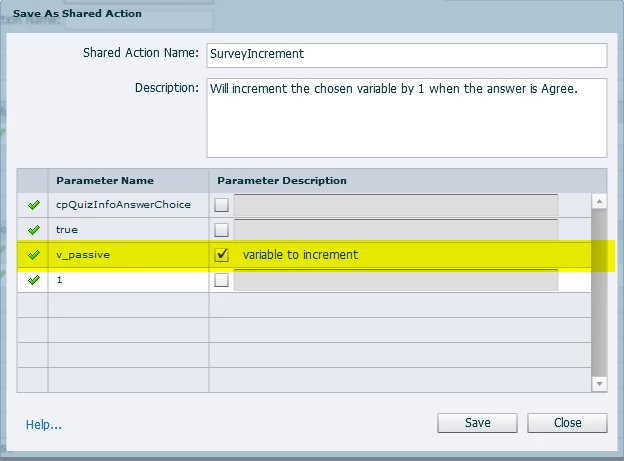
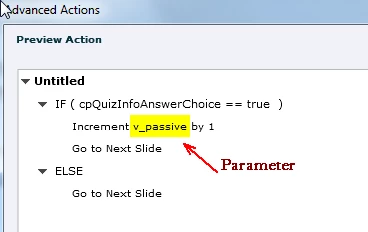
  • Create this shared action, which has only one parameter: the variable that has to be incremented for that question slide:

  • Apply this shared action to all question slides for 'After Survey' event; be sure to indicate the correct variable
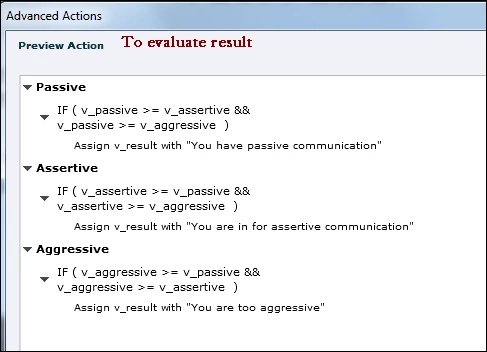
  • At the end of the quiz, you'll need another event (On enter for the results slide or a button) to trigger this conditional action:
  • You will have to edit that last conditional action, if you want more than just replace a variable 'v_result' with its value. I just inserted that variable in a text container.

2 replies

louiseb25392135
Participating Frequently
February 10, 2017

Hi Ines,

I don't think you will be able to achieve what you are looking for with a pretest. Our team built a similar interaction in Captivate - each statement had a button which incremented a variable (with there being a variable for each type of communication). We then used a conditional action to check which variable had the highest value and then showed the user the appropriate feedback for their communication type.

Louise

InesCosta
InesCostaAuthor
Known Participant
February 10, 2017

Thanks, Louise! I'll try that!

Lilybiri
Brainiac
February 10, 2017

Pretest questions are no really what you need, I'm afraid. What do you want to do with the results? That is more important, than which type of questions you are using. This is an old post, which I once wrote to answer a similar question on the forum:

Graded Survey? - Captivate blog

Maybe it woud be easier now, but just posted this example to show that the questions are not the problem, but what you want to do with the results.

Pretests are just meant tyo branch the learner based on the results, and they cripple navigation. They are not meant for what you explaineD.

InesCosta
InesCostaAuthor
Known Participant
February 10, 2017

Thanks for your help, Lilybiri, but it seems that this is not quit what I need… This survey tells me if I would or would not be a good teacher. What I need is a survey that gives me 3 possible answers: whether I’m the assertive, aggressive or passive type of communicator.

I’ve tried to adapt your blog example… no success!

Lilybiri
Brainiac
February 14, 2017

I think it's the same as yours... (but in portuguese )


You'll have to debug. Can you insert a text container (shape or caption) on the first slide. Insert the three variables in that container (using the X button in the Character part of the Properties panel). Time that container for the rest of the project, always on top.

Test the project: do the variables update correctly on the quiz slides?

Check the Shared action in the Library, Usage number: do you have as many instances as the number of quiz slides?

Double-check the conditional action at the end: are the conditions correct, did you use AND and not OR?