

Inspiring
January 6, 2016
Answered

Question : Assign a parameter to "Open URL" in a Shared Action?

  • January 6, 2016
  • 1 reply
  • 326 views

Hello,

In a Shared Action is it possible to assign a Parameter to the Open URL action?
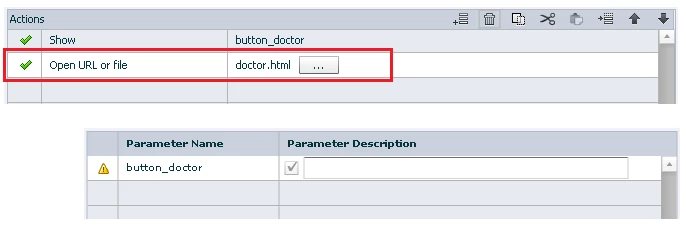
Thank you


Peter

Cardiff (Clear, but rain forecast)

Wales

Uk

    This topic has been closed for replies.
    Correct answer Lilybiri

    Not AFAIK. Only parameters are the compulsory ones (objects, groups and slides) and the candidate parameters (variables and literals). The argument of the command Open URL is not in that list. That argument is on the same level as the arguments in Apply effect: only the object will be a parameter, not the effect itself nor the Start or Duration of that effect (if you are on CP9).

    I will repeat here an old feature request: if we were able to use concatenation to such a command ....the URL could be stored in a variable.

    Your goal can be achieved with JS.

    1 reply

    Lilybiri
    LilybiriCorrect answer
    Legend
    January 6, 2016

    Not AFAIK. Only parameters are the compulsory ones (objects, groups and slides) and the candidate parameters (variables and literals). The argument of the command Open URL is not in that list. That argument is on the same level as the arguments in Apply effect: only the object will be a parameter, not the effect itself nor the Start or Duration of that effect (if you are on CP9).

    I will repeat here an old feature request: if we were able to use concatenation to such a command ....the URL could be stored in a variable.

    Your goal can be achieved with JS.

    Inspiring
    January 6, 2016

    Lilybiri,

    I suspected that the answer is as you described.

    I was hopeful that there may have been a workaround using a variable... it would be nice if Adobe implemented your concatenation request.

    Thank you.

    Peter

    RodWard
    Community Expert
    Community Expert
    January 6, 2016

    In theory you COULD have that URL assigned to a variable and then dynamically change the variable value as needed via some Advanced Action.  Not sure if that's any real advantage though.  If that's about all you had in the Shared Action then there's be little point in using it over just a normal action.