Inspiring
July 9, 2018
Question

Quiz slide preventing AA?

  • July 9, 2018
  • 1 reply
  • 540 views

Hi again,

I have an issue in a module.

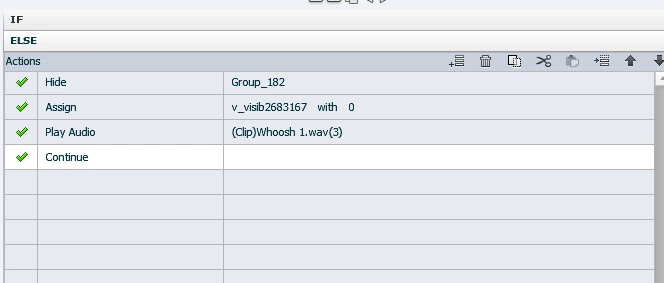
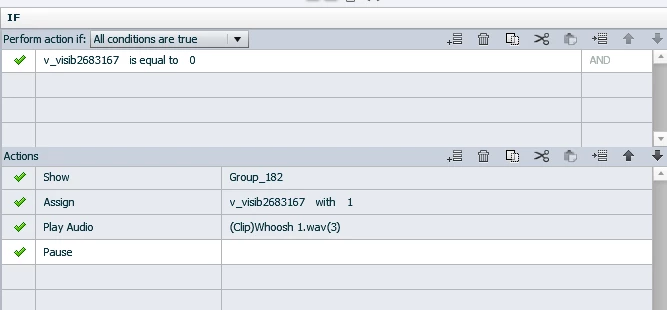
To enable people to view a help screen pop up there is an question mark icon. Once clicked it executes the AA below.

It shows a. the pop up with the explanation (= help window) and b. an invisible smart shape that is placed above the red X in the pop up. So users can click on either the icon or that X to execute the same AA in order to close the help pop us.

So far so good.

But in the quiz slides toggling the pop up using the Icon works. But when the pop up is shown after clicking on the question mark icon using the invisible box to close via the X doesn´t work anymore.

Any idea how to circumvent this?

Thanks a lot!
    This topic has been closed for replies.

    1 reply

    Lilybiri
    Brainiac
    July 9, 2018

    All embedded objects on quiz slides, those without an individual timeline, have absolute prority in the stack. Where is that X 'button' or is it a hyperlink?

    Can you show a screenshot of the stage with the popup open on a quiz slide? Maybe one of the embedded objects is covering your X button. I suspect you have been reading my blog (from the way you label the variables ).  I just posted a blog in the portal, did you try using a multistate object instead of a Show/Hide workflow?

    Inspiring
    July 9, 2018

    Hello Lieve,

    thank you for your time!

    So you mean I should add the invisible toggle box in a multistate version of the help window itself?

    Inspiring
    July 9, 2018

    Or use an empty box (opacity 100) as state 1 of the help window and the visible one as state 2 to toggle?

    How do I get the X to work?