



"User denied geolocation" error
I'm working on a project in Captivate 9 using geolocation. I've set the variables for UK, Germany, and Americas. The first slide doesn't use geolocation, but thee second one does. I have all the assets hidden by default, and have added DetermineGeoLocation actions to show the relevant assets (images and text) as follows:
- If cpInfoGeoLocation is equal to Germany (show relevant assets)
- If cpInfoGeoLocation is equal to UK (show relevant assets)
- If cpInfoGeoLocation is equal to Americas (show relevant assets), else show relevant assets for the rest of the world
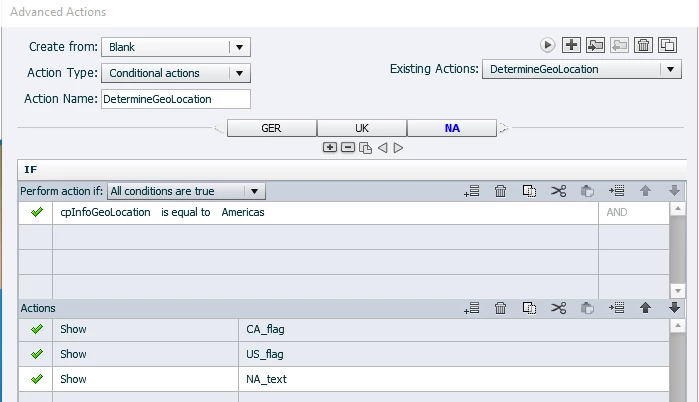
I saved and published, making sure that geolocation was turned on in the publish settings. I then uploaded it to my web server. However, when I launch, the screen is blank except for a couple of navigation buttons at the bottom. In Chrome, I get an error in the corner saying "User denied geolocation", which appears for about two seconds and then disappears, leaving only the nav buttons.

In other browsers I don't get the error, just the nav buttons. In IE/Edge/Firefox, I get prompted to allow the site to get my location. I do allow it, but still no change. I also find it strange that the first slide doesn't appear either, and there are no geolocation actions relevant to that slide. What am I doing wrong?
 AdChoices