samamara
Known Participant
February 27, 2023
Answered

Reporting Help Please

  • February 27, 2023
  • 2 replies
  • 6640 views

Good day, all; 


I am looking for some help with a reporting issue that I can't quite figure out. I'm hoping someone may be able to point me in the right direction with some solutions on where to start looking. 


I created three simulations in Captivate 2019 (11.5.4.613 for Mac) that have tasks for quiz points (no negative points). All three simulations have the same quiz preferences for reporting, settings and pass or fail, and as you can see from the attached PDFs of Advanced Interactions, all the quiz questions have points and report to the total. Further, all three have the same settings in the LMS (Blackboard): unlimited attempts and a requirement of 80% to pass to further the tasks via adaptive release.


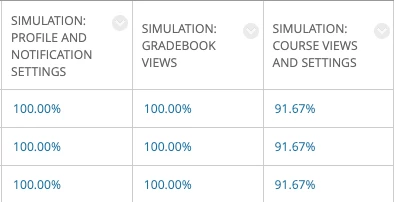
The issue is that one of the simulations is not reporting 100% even if everything is done correctly. I have done this myself to test after a participant alerted me to the issue, and what's more, it wouldn't be a coincidence that everyone is getting 100% in two simulations and the same 91.67% in the third (I also got 91.67%). For the simulation that isn't reporting 100%, there are 24 points available so I guess that somewhere two points aren't being recorded...?


I've checked that all required scorable items are included in the quiz and are added to the total and I've double-checked the quiz settings and the Blackboard settings, but I can't quite figure the issue. Any ideas or suggestions of where to look and/or what to check would be appreciated!


Thanks,

samamara

    This topic has been closed for replies.
    Correct answer RodWard

    Hello again, Lilybiri;


    Many thanks for your continued feedback!


    Ok, this is the project I had asked for support on before - where I used your workflow of having a large blank button covering the slide triggering a failure advanced action - with one small correct target on top that triggers a success action.


    On each slide there is an instruction and a target. If the target is clicked, the project advances. On the first click on the wrong place, a hint pops up. If the user gets it right the second time, the project advances. If the user gets it wrong for a second time, they get a failure message and a button to continue to the next slide. They get a point in the quiz for clicking correctly either the first or second time; none if they get the failure message. On two of the slides in that simulation, there are two targets (each with the success action of go to the next slide) and each worth a point since success gives the user a point in the quiz. But the reason that each successful user was only getting 91.67% rather than 100% is because those 'extra' (i.e. not clicked targets) were each an available point that users could never get (if they click one, they never have a need to click the other). 


    I'm not sure if that is clear...? Everything in the simulation "works" the way it should. It's just these two slides that have the extra phantom quiz point that are messing up the final score and not allowing for a 100% in the grade centre. I don't know if there is a solution for this. I'm not sure that all the other steps you mention above are necessary since the issue is just the score, but perhaps what you said about "adding a score for the slide" may be a possible avenue...what do you think?


    Thanks again!

    samamara


    There are a couple of ways around the problem you describe (where only one of two scorable objects will be clicked but you don't want the missing score to affect the user being given a perfect passing grade).


    One easy way is to have your Completion and Pass/Fail awarded on the basis of scored points rather than percentage.  If the user only has to gain a specified number of points to pass, then even if they only click one of the two buttons on each of those slides you mention, then the missing scores will not cause issues.  If you have pass/fail determined by percentage (not points) then the problem becomes that Captivate calculates the final pass/fail based on ALL of the scored objects, and your implementation then means that the user can never click all of the buttons to reach 100%.


    I've suggested the method above (using points) because it can be done with stanard Captivate functionality. Another way to achieve what you want is to use the CpExtra widget and a Conditional Advanced Action to force extra scored points to be reported to the quiz.  Basically, when the Conditional Action detects the user click one of the two buttons on the slide it uses CpExtra's xcmndScore command variable to increase the quiz score to compensate for the user NOT clicking the other button.   This then allows you to set the quiz completion and pass/fail to be determined by percentage score instead.
    Command Variables | CpExtra Help (widgetking.github.io)

    Please note that the widget is not free.  But if the first option I suggested is not acceptable, then perhaps the cost of the widget will be worth it for your project.


    2 replies

    New Participant
    April 15, 2023
     
     
    Lilybiri
    Legend
    February 27, 2023

    I regret that you cut off the header section in the Advanced Interaction panel, which is very important: it shows which interactive objects have been selected and the Total score as well. Is it possible to post them, and indicate which panel is for the 'wrong' simulation?

    BTW you can include images which save us the time to open each attachment and makes it easier to compare directly.


    samamara
    samamaraAuthor
    Known Participant
    February 27, 2023

    Good day, Lilibiri; 


    Thank you for your reply, as always 🙂


    I believe I have figured out the problem, and it was a rather simple issue: two of the slides in that 'wrong' simulation have two target options (as there are two possible correct answers). Each of the targets has a quiz point allotted and since the learner can only click on one (and indeed only needs to click on one) there are two questions that are never accounted for (hence the 91.67%).  


    So now that changes my question from "What is the issue?" to "How can I solve the issue?". Currently I can only think to remove those targets/scorable items from the quiz, though if you (or anyone) can think of a solution I'd appreciate the input. 


    TIA!

    samamara

    PS: I'm sorry about the attachments. I know you can insert images - I did with that clip from the grade centre - but I couldn't take a clip of the entire advanced action panel and thought the attachments would add more information. I'll do the images next time 🙂

    Lilybiri
    Legend
    February 27, 2023

    You could have detected this in the Advanced Interaction panel...

    Since it is a simulation, is it possible to show me a screenshot of the slide, and indicating the two possible targets? I have workarounds for such a situation, but am not sure which one applies in this case. It is clearly a customized slide, you cannot have two targets with a default simulation in assessment/training mode. You'll probably need an advanced action and - if possible - two Next buttons, one without and one with a score. I hope it is not a responsive project?