


Inspiring
December 20, 2021
Question

Responsive project captivate 2019 - Fluid box labels not displaying

  • December 20, 2021
  • 1 reply
  • 245 views

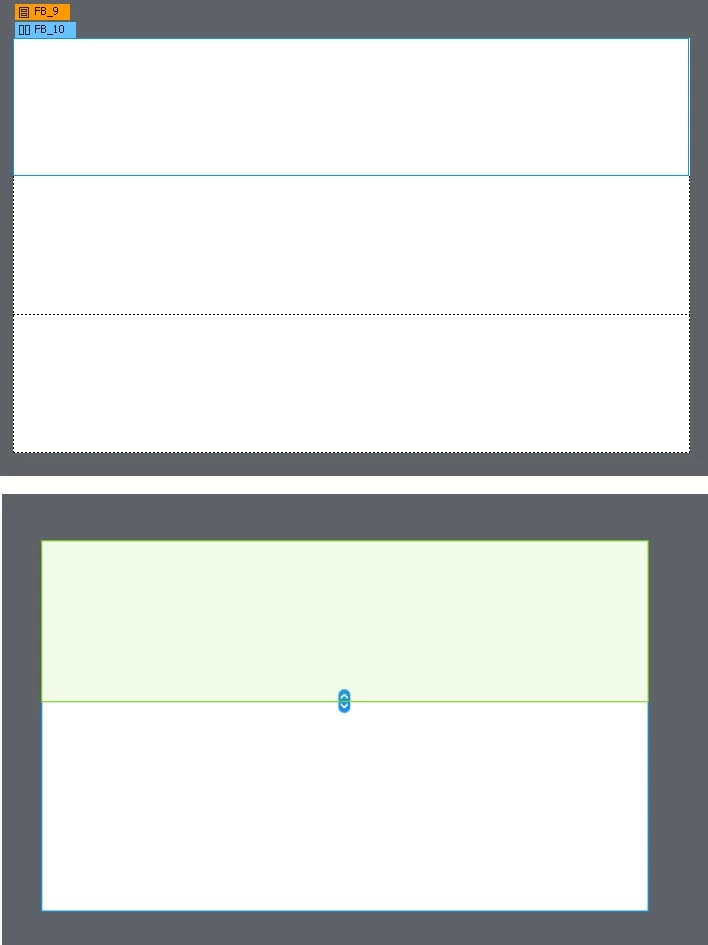
For some reason, the fluid box labels are no longer displaying in a particular project. I must have toggled something. When I create anew responsive project, thae fluid box lables appear correctly. How can I "fix" my current project so I can see those labels again?


In this pix, you see the labels are fine in the first image, from my new project. In the image below that, you can see that thos labels are missing.


What dumb thing did I do?
 

Thanks!

    This topic has been closed for replies.

    1 reply

    Lilybiri
    Brainiac
    December 20, 2021

    Are both projects created with CP2019? Those labels didn't appear in CP2017 projects. Try to update the project.

    Inspiring
    December 20, 2021

    Yes both projects are Captivate 2019, latest version, but the problem has gone away.


    A few moments ago I checked Project A and confirmed that the FB labels were NOT displaying, not even in a new slide. When I created Project B, I confirmed that FB boxes WERE visible. So, I undocked each project in order to show them side-by-side in a screenshot, and lo and behold, the undocking action "fixed" the problem. The FB boxes are now displaying properly in both projects, even after redocking.


    So the behavior seems related to some sort of refreshing issue that was not solved either by executing a Save As for the projecy, nor a re-start of Captivate. Undocking did the trick.


    Thanks for helping me figure it out!


    Charlie

    Lilybiri
    Brainiac
    December 20, 2021

    CP has several refreshing issues, glad you figured this out. It probably would have been solved as well on restarting Captivate.