


CaptivEd
Inspiring
April 29, 2016
Answered

Restricting seekbar navigation possible?

  • April 29, 2016
  • 4 replies
  • 1878 views

Using CP8

I have a client who is requesting the removal of the progress bar because they do not want learner to be able to skip past a bunch of content. I like having the progress bar because it indicates progress and aids in navigation.

The only thing that stops the progress bar from being used to skip past all slides are quiz slides where the learner is required to answer the question before they can proceed. Is it possible simulate this for non-quiz slides so the learner can not drag the progress bar across multiple slides? So clicking an object like a NEXT button would "submit the correct answer" for that slide?
    This topic has been closed for replies.
    Correct answer CaptivEd

    This is a repost of my workaround which works for restricting navigation. I could not change the original post so am creating new one.

    You would follow this procedure to prevent someone from using the seekbar to skip over several slides at at time.

    ------

    Found a pretty nice workaround for this, for my case. I believe this would only work if you're using buttons/objects on the screen to navigate vs. using the Forward button on the playbar.

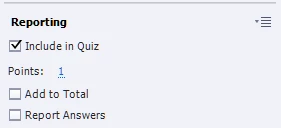
    • When you create a NEXT button, go to the Reporting section and check the Include in Quiz check box. You'll want the Next button on every slide to have this.
    • I unchecked both of the other 2 check boxes below. You have have at least one point.

    • In Preferences -->Quiz --> Reporting, uncheck Enable reporting for this project
    • In Preferences -->Quiz --> Settings, from the Required list choose the "Answer all..." entry.
    • Uncheck the other checkboxes as needed.
    • In Preferences -->Quiz --> Pass or Fail, put 0 % or more of total points to pass and change If Failing Grade to Infinite Attempts.
    • Hide the Quiz Results slide

    Now, if a learner attempt to scrub past whatever slide he/she is on, they won't be allowed to.

    4 replies

    CaptivEd
    CaptivEdAuthorCorrect answer
    Inspiring
    May 25, 2016

    This is a repost of my workaround which works for restricting navigation. I could not change the original post so am creating new one.

    You would follow this procedure to prevent someone from using the seekbar to skip over several slides at at time.

    ------

    Found a pretty nice workaround for this, for my case. I believe this would only work if you're using buttons/objects on the screen to navigate vs. using the Forward button on the playbar.

    • When you create a NEXT button, go to the Reporting section and check the Include in Quiz check box. You'll want the Next button on every slide to have this.
    • I unchecked both of the other 2 check boxes below. You have have at least one point.

    • In Preferences -->Quiz --> Reporting, uncheck Enable reporting for this project
    • In Preferences -->Quiz --> Settings, from the Required list choose the "Answer all..." entry.
    • Uncheck the other checkboxes as needed.
    • In Preferences -->Quiz --> Pass or Fail, put 0 % or more of total points to pass and change If Failing Grade to Infinite Attempts.
    • Hide the Quiz Results slide

    Now, if a learner attempt to scrub past whatever slide he/she is on, they won't be allowed to.

    CaptivEd
    CaptivEdAuthor
    Inspiring
    April 30, 2016

    Found a pretty nice workaround for this, for my case. I believe this would only work if you're using buttons/objects on the screen to navigate vs. using the Forward button on the playbar. This is also assuming you don't have a real quiz. If you do, it will still work, but you just can't uncheck as many options, and you'll have to determine how adding 1 point will affect the passing score. 

    • When you create a NEXT button, go to the Reporting section and check the Include in Quiz check box. You'll want the Next button on every slide to have this.
    • I unchecked both of the other 2 check boxes below. You have have at least one point.
    • In Preferences -->Quiz --> Reporting, uncheck Enable reporting for this project
    • In Preferences -->Quiz --> Settings, from the Required list choose the "Answer all..." entry.
    • Uncheck the other checkboxes as needed.
    • In Preferences -->Quiz --> Pass or Fail, put 0 % or more of total points to pass and change If Failing Grade to Infinite Attempts.

    Now, if a learner attempt to scrub past whatever slide he/she is on, they won't be allowed to.

    Lilybiri
    Brainiac
    April 30, 2016

    Be VERY careful with your workaround, because setting Required to your option can disturb the navigation in your file seriously, even on content slides. Just a warning. Did you try remediation or Review in that quiz?

    CaptivEd
    CaptivEdAuthor
    Inspiring
    May 2, 2016

    I'll have to do so more testing on this. The Quiz Results slide is hidden in the course, so there is no quiz review. That's actually something I should be adding to the procedure above: to hide the Quiz Results slide if it's not needed. I'm having trouble being able to edit my previous answers. It says "No Actions available" when I try to edit.

    Thanks.

    CaptivEd
    CaptivEdAuthor
    Inspiring
    April 29, 2016

    That looks like a good product. I think Adobe should purchase it and implement it in Captivate!

    Lilybiri
    Brainiac
    April 29, 2016

    Don't count on it; it is IMO very cheap for the big range of tweaking possibilities that it offers. But only for HTML, not for SWF output.

    Lilybiri
    Brainiac
    April 29, 2016

    If you need only HTML output, the CpExtra widget of InfoSemantics gives an easy way to restrict scrubbing the progress bar. Have a look at:

    Introduction to CpExtra | Infosemantics Pty Ltd