


Known Participant
March 9, 2021
Answered

script too long message when clicking on a smart shape used as a button

  • March 9, 2021
  • 2 replies
  • 836 views

Hi, I have a project on Captivate (I"m on a free trial, vers 11.5.5.553). First I publish it and I run it. In the middle of my project, there are 4 branches, whatever the branch I choose, when I arrive at my 23rd slide from the start, if I click on the smart shape used as a button, the whole project freezes, and after a little while I have a script too long message (in french: Cette page web ne répond pas à cause d'un script de longue durée). There is nothing particular about that slide, just an image, a help button that takes you to a help slide (and then back to the slide last visited), and the shape used as a button with a "go to" action that takes you to a random question slide further down the project.


The slide before the one where the problem appears is a random question slide, with an advanced action on entry, and another one on success\failure. I have many other advanced actions before that slide. Technically they are all ok. I can't figure out what the problem is...


What should I look at as a cause for that message to appear?
This topic has been closed for replies.
Correct answer Lilybiri

I.m experimenting with different things, I figured out that I forgot to specify an Else action. That probably was causing the problem. My teachers always said to me that you learn by doing.


I'm going to try it that way instead.


Il n'est pas nécessaire d'avoir la partie ELSE, au contraire il peut même créer le chaos.


But you make it too complicated. I understand that you want this to happen for this particular slide in the pool:

For the first example (12-13, 16-17, 20-21) I would use this much more simple action. I created a user variable named v_slide.  Use the On Enter action of the question slide in the pool for this action:

  Assign v_slide with cpInfoLastVisitedSlide

This results in v_slide = 12 in the first situation, = 16 in the second, and =20 in the third.


For the Success and Last Attempt action:

   Assign cpCmndGotoSlide with v_slide

Why? Because cpCmndGotoSlide has an index which starts with 0, whereas cpInfoLastVisitedSlide starts with 1. The last command will then go to slide numbered 13.


For the other example (16-20, 17-21, 18-22) the SuccExpress/Last Attempt action will need an Expression:

  Expression cpCmndGotoSlide = v_slide + 3


My moto is KISS: why make it complicated when it can be in a simple way. 

If you have even more different situations, you may create a second user variable to store the value which is now 3 and would have been 0 if Expression was also used in the first example. Personally I would even use a shared action, where you can define the 3 as a parameter to be filled in. It would be the only parameter. 


2 replies

Lilybiri
Brainiac
March 9, 2021

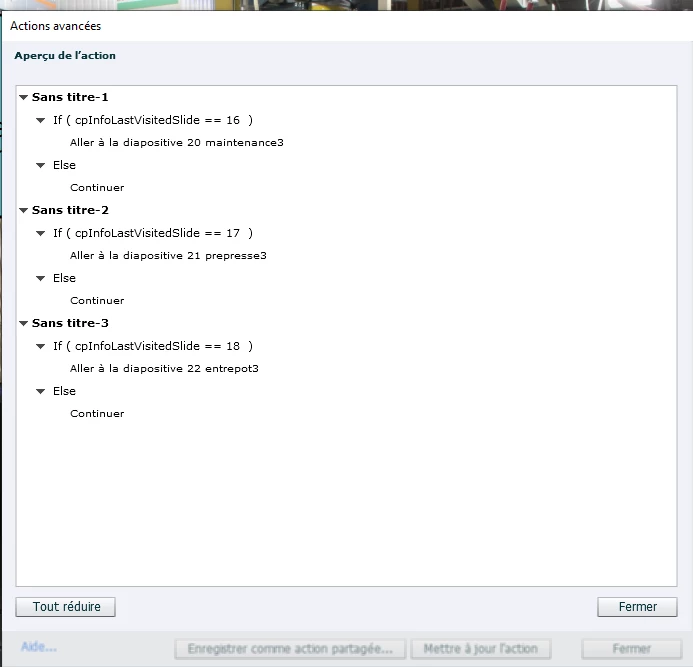
Est-ce qu'il est possible d'insérer le 'Preview' de l'action avancée de l'événement 'Entrée' pour les questions dans le pool? Il faut être vigilant que ces actions sont plus limité que dans une question normale (not  random).

Known Participant
March 9, 2021

I tried to do it the simplest way possible, without any action on entry, On success and failure, because both need to go to the same place. I made something like this.


on a random question slide that you can access only from slides 12, 16 or 20, on one advanced action, 3 conditional action tab that say


tab 1: if cpinfolastslidevisited=12, then go to slide 13

tab 2: if cpinfolastslidevisited=16, then go to slide 17

tab 3: if cpinfolastslidevisited=20, then go to slide 21


Would such an action be ok?


Known Participant
March 9, 2021

I.m experimenting with different things, I figured out that I forgot to specify an Else action. That probably was causing the problem. My teachers always said to me that you learn by doing.


I'm going to try it that way instead.


RodWard
Community Expert
March 9, 2021

My guess would be that it is related to your Advanced Actions.  They may be getting into some kind of loop.


Take a copy of your project file and start removing the Advanced Actions from those question slides, republishing after each step to see when it then starts to work again.