

RyanS_Extron4075776
Inspiring
May 23, 2019
Question

Shadows and Reflection Not Working in States

  • May 23, 2019
  • 1 reply
  • 1572 views

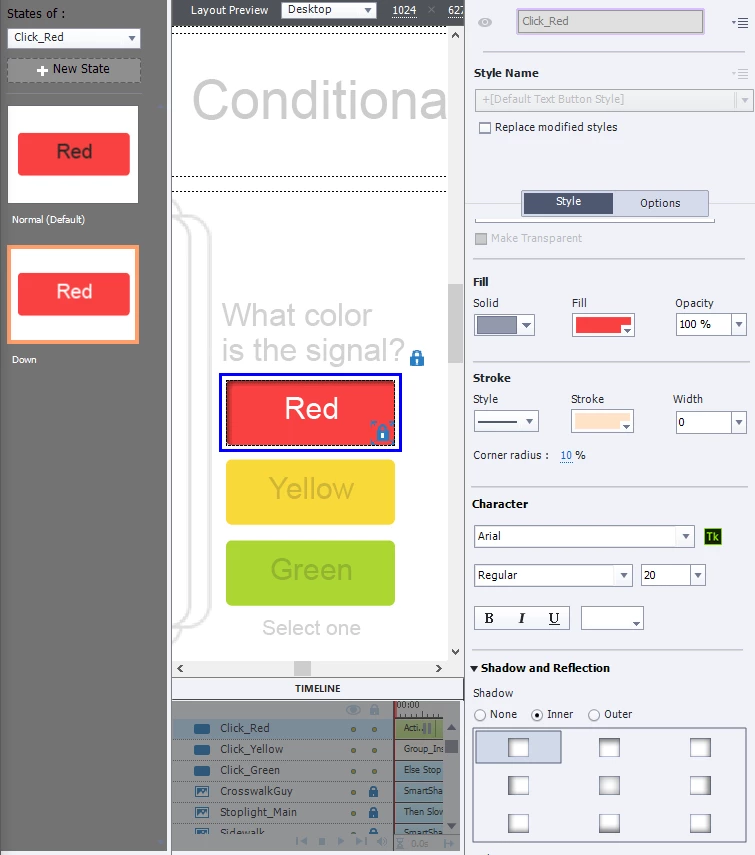
I can't get the shadow or reflection to show up in any state except the default state. I'm not sure why the Shadow and Reflection area is not grayed out if it can't be used for the other states.

This topic has been closed for replies.

1 reply

Lilybiri
Brainiac
May 24, 2019

Which version are you using? You seem to talk about InBuilt states which have restrictions. Have a look at this short video:

Reflection and Shadow in States

For the button InBuilt states: no problem to add a shadow to a Visited state, will show up in the Object State panel. For the Rollover and Down, it will show up in Preview HTML in Browser, but seems to be invisible in the Object State panel. Did you test in Preview,

.:

RyanS_Extron4075776
Inspiring
May 24, 2019

I am using 2019 Release, version 11.0.1.266

Below, I placed a drop shadow in the visited state, and when I tried in preview, it did not show up.

Lilybiri
Brainiac
May 24, 2019

Well, I don't know why it's working with your program, but not with mine.


Already mentioned what I suspect: corruption.

It is clearly not the project itself, since you have same issue with another project. Two possibilities:

  • Corruption in Preferences. You can solve that by running the CleanPreferences... file which you find in the subflder 'utils' of the installation folder; Captivate needs to be closed, you need admin rights. Yuo may lose some customization, did you customize a lot?
  • Corruption in the theme you are using. Is this one of the themes packaged with Captivate? I didn't ask about that, but seeing a Transparent button where an overridden Text Button style shows up looks very suspicious to me.