


johnb98198346
Inspiring
May 22, 2015
Answered

Slide Transition Fade Issue

  • May 22, 2015
  • 2 replies
  • 957 views

Hi,

I'm experiencing a strange slide transition issue.

Essentially, I have set slide 18 in my project to transition with a fade.

Slide 17 --> Fade Transition --> Slide 18

When I click on slide 17 and then select "Preview" --> "From This Slide" it looks awesome. The transition from 17 to 18 is perfect.

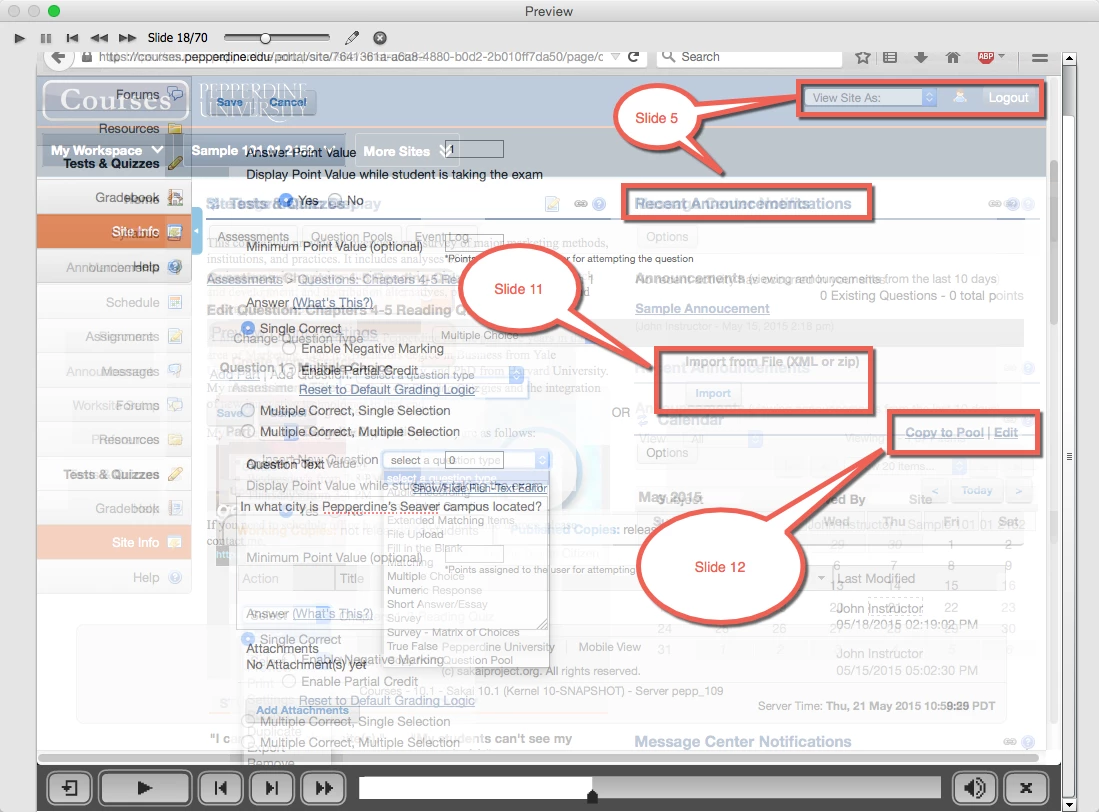
However, when I select "Preview" --> "Project" and get to the Slide 17/18 transition, it shows a very strange fade. I paused the fade and took a screenshot. See the attached image below.

It looks almost as if it has stacked 3 arbitrary slides on top of each other (Slides 5, 11, and 12) and oddly shows them in the transition. I've tried copying and pasting the project into a new project. I've tried publishing the project as a SWF file (to see if it publishes that way). I've tried re-arranging the slide position, saving, then changing it back and saving. Nothing works.

Does anyone have any thoughts on this? Thank you!
    This topic has been closed for replies.
    Correct answer johnb98198346

    Ok, I believe I found a solution.

    I tried copying slide 5, for example, pasted it in another project window, and then deleted the original slide in the original project. Then, I copied the slide I pasted into another project window and pasted it back into the original project. This did not work.

    My original approach was to address the slides that appeared to "stack" on the faded transition. But I did not attempt to work with the slide itself where the transition was actually applied. That was the key.

    I duplicated the slide that contained the transition, hid the original, and then when viewing the preview AND published SWF file, the behavior of a normal faded transition returned.

    I hope this helps anyone else who has run or will run into a similar thing!

    2 replies

    New Participant
    July 25, 2015

    Hello

    Is there no other solution? I have the same issue.Hiding slides isn't working verry well when importing sound on several slides.

    johnb98198346
    Inspiring
    July 27, 2015

    Hi,

    The solution I posted above works for me - every single time.

    Once again, create the slide, including the transition. Then duplicate it and hide the original. KEEP the hidden original as part of your project. Don't delete it.

    Whenever I do slide transitions, I automatically follow this procedure as a matter of course and it works just fine. It is a bug/glitch which hopefully Adobe will fix at some point.

    New Participant
    July 27, 2015

    Hi

    That works for the fading problem, but when adding sound afterwards it adds sound to the hidden slides as well.

    Erik Lord
    Inspiring
    May 22, 2015

    What happens if...

    You make a copy of the project and delete the first, say, 10 slides, and the last slides after slide 18 or 19?

    You should certainly then not see anything from Slide 5, right?

    You've actually published this entire piece and you see this same thing in the result, right?

    What if you delete the odd slides (i.e. slide 5, 11, 12) - from a copy of the project - and publish?

    Do OTHER slides peep through now, or all is good?

    If all good, then maybe something...stuck about the slides you're seeing. Can you recreate them easily? (i.e. 5, 11, 12)

    RodWard
    Community Expert
    May 23, 2015

    I'm with Erik.  Don't ever judge Captivate output based on the Previews.  Publish it out and test on your final platform whatever that is.  Then judge the results.  Otherwise you could be just chasing your tail here trying to debug something that is only ever meant to be an approximation of the final result.

    johnb98198346
    Inspiring
    May 23, 2015

    Thank you both for replying. I failed to mention this in my original post, but I did, in fact, publish it as a SWF file and got the same result.

    I'll try some of the suggestions that Erik made and let you guys know. If anyone else has any other suggestions, I'm open to anything and everything!