samamara
Known Participant
April 9, 2021
Answered

Slowdown Slide Playback (with .swf file)

  • April 9, 2021
  • 1 reply
  • 890 views

Hi all 🙂


I have a slide in a simulation that recorded me scrolling down the screen and it recorded as such on the timeline: 
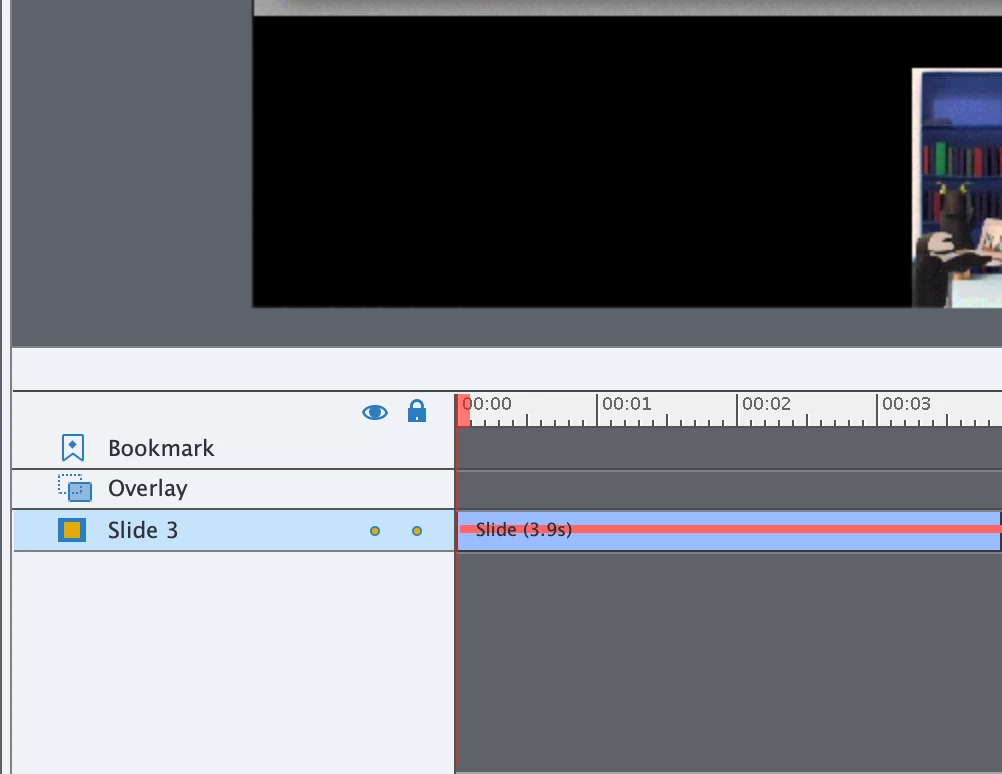


Is there any way in Captivate to make it so when the user goes through the simulation it doesn't scroll as quickly? It's about 4 seconds now but I'd like to increase it to about 7. I think I could probably create a video of the scroll and then import it into the project, but is there a way to do this inside of Captivate?


Thanks in advance 🙂


    This topic has been closed for replies.
    Correct answer Lilybiri

    It is a FMR slide.  Since you want to replace it, I would recommend to insert a Video Demo slide. Reason: no conversion from SWF to MP4 will be necessary (it sometimes goes wrong) and the quality will be better.

    Use this workflow:

    • Set up the application to capture in the correct situation.
    • In Captivate select the slide before the new slide
    • Use the big button Slides, Video Demo
    • Record and try to be slow enough
    • After ending the capture you'll have cpvc-slide and the Video Demo Editor can be used on this slide; it has a lot more functionality than the FMR slides.

    1 reply

    Lilybiri
    LilybiriCorrect answer
    Brainiac
    April 9, 2021

    It is a FMR slide.  Since you want to replace it, I would recommend to insert a Video Demo slide. Reason: no conversion from SWF to MP4 will be necessary (it sometimes goes wrong) and the quality will be better.

    Use this workflow:

    • Set up the application to capture in the correct situation.
    • In Captivate select the slide before the new slide
    • Use the big button Slides, Video Demo
    • Record and try to be slow enough
    • After ending the capture you'll have cpvc-slide and the Video Demo Editor can be used on this slide; it has a lot more functionality than the FMR slides.
    samamara
    samamaraAuthor
    Known Participant
    April 9, 2021

    Thanks Lilibiri; 


    I was hoping I wouldn't have to replace it but it does make sense to do it that way and ensure better quality. 


    Thanks!

    Lilybiri
    Brainiac
    April 9, 2021

    You're welcome! Editing that slide (in a video application) would not even guarantee that the FMR was converted as expected when published. This workflow doesn't suffer from that.