


ruthg84
Known Participant
June 8, 2017
Question

Submit button on Drag and Drop unresponsive

  • June 8, 2017
  • 1 reply
  • 1396 views

Hi,

I was adjusting some things on a drag and drop slide (deleting the rollover and down states on the submit, undo, and reset buttons) and I found that afterwards, the submit button was no longer responsive, i.e. I could not click on it. The undo and reset buttons were still fine. I tried remaking the drag and drop interaction from scratch, and even copying and pasting everything to a new slide, but I still had the problem occurring when previewing.

Is there some kind of problem that can be created by deleting the rollover and down states? For all other buttons in my project it seems to have worked fine and not affected their inactivity.

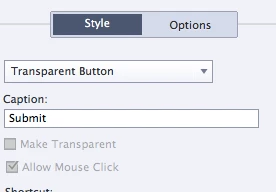
I noticed in the properties panel for the submit button that 'allow mouse click' is greyed out. Is this something to do with the problem?
This topic has been closed for replies.

1 reply

Lilybiri
Brainiac
June 8, 2017

Like for quiz slides, those buttons are sort of 'protected', and probably you have messed up something. Which style was used by the Submit button? Why delete the InBuilt states instead of making them identical to the Normal state? Did you edit the object style?

ruthg84
ruthg84Author
Known Participant
June 8, 2017

I've been having a lot of problem with inbuilt states (sometimes they change so that the rollover and down states become a different style- seems like a bug) which is why I am deleting them. The submit button was set to my primary button style, which is used for all primary buttons in my project. I didn't edit the object style on this slide no, it's just set to the primary button style. This is a slide in my template. Is it something to do with it being a template that is causing the problem?

Here are some screenshots of the properties panel for the submit button, in case you can see anything that is off:

ruthg84
ruthg84Author
Known Participant
June 8, 2017

And just to clarify with the problem with inbuilt states, here is a screenshot showing how the rollover and down states change to a different style. The style for the normal state is EXIT and it should also be the same for the rollover and down states. I first got this problem on interactive elements after applying a theme to a project (this is no longer referring to the template).


(I can fix it by going into state view and refreshing the rollover and down states. They then change back to the EXIT state.)