josteinf92070226
Inspiring
August 27, 2015
Answered

svg - problem in AC9

  • August 27, 2015
  • 1 reply
  • 841 views

I experienced a problem when i have added two svg files into a slide - the first picture shows how the logo should be, in the other slide i have included another svg file in the slide and the logo changes.  Both svg files is created in Adobe Illustrator - is there something wrong with my settings i Ai?

    This topic has been closed for replies.
    Correct answer josteinf92070226

    Created from scratch in CP9. Im new to Illustrator, cold it be something wrong with the svg file ?


    HaridossR1234 found the solution - Thank you

    teps to solve the issue:

    Open the SVG in Illustrator.

    Select File->Save As and click on Save button.

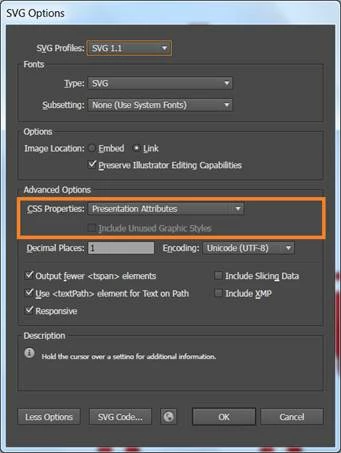
    “SVG Options” dialog that is shown below will be opened.

    If you do not see “Advanced Options” please click on “More Options” to open the Advanced Options.

    please select CSS Properties as “Presentation Attributes” and do not select “style Elements”.

    Save the SVG and use it in Captivate.

    1 reply

    Participating Frequently
    August 27, 2015

    Hi,

    Can you please upload your project file(.cptx) to dropbox.com and email me the download link at ramadoss@adobe.com

    Thanks,

    Hari

    josteinf92070226
    Inspiring
    August 28, 2015

    The problem is solved, i did a mistake when i saved the svg file in Ai.

    Lilybiri
    Braniac
    August 28, 2015

    Could you explain the mistake, maybe this can help other users?