


Participant
April 14, 2020
Question

Unable to open Adobe Project Video Template

  • April 14, 2020
  • 1 reply
  • 499 views

Hi All,


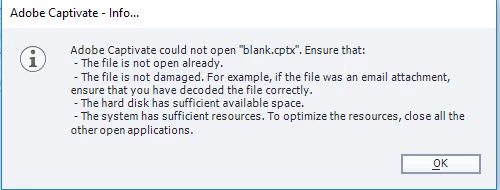
One of my colleagues has shared the video template via email & OneDrive, when I tried to open the Video Template in Adobe Captivate 2019, received the following error. Can I know the RCA and solution 


    This topic has been closed for replies.

    1 reply

    Lilybiri
    Legend
    April 14, 2020

    Are you ssure it is not the Blank theme, which has an extension cptm? There is a Blank theme, never heard about a Blank template. Captivate doesn't package any templates which are cptl-files. You talk about a cptx file.


    There may be many reasons for this error message: project was not closed in the proper way for another user, theme or project is corrupt, project was created with another more recent version than you are running.... Anywat it is not a template you have, and not for video, it is normal cptx-file.


    D NaliniAuthor
    Participant
    April 14, 2020

    Thank you for the quick response. I.m sure it is not a blank theme with an extension of cptm. Also, my Colleague and I are working on the same version (Captivate 2019).

    Attached is the details of the video which im unable to open


    Lilybiri
    Legend
    April 14, 2020

    There are two releases in CP2019 which are not compatible: 11.0 and 11.5. Check the full version number under Help, About Captivate, please.