


Inspiring
November 2, 2016
Question

Vertical lines in text entry boxes with scalable HTML content..

  • November 2, 2016
  • 3 replies
  • 673 views

Hello,

we are creating a software simulation eLearning for PCs and mobile devices.

This means that we have to export the project as HTML and the scalable content box needs to be checked.

Unfortunately, checking this box gives you vertical lines in the text entry boxes..
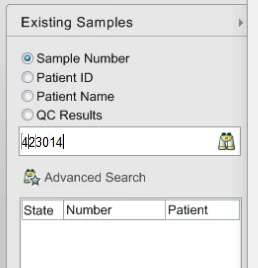
One eventual work around is to create a text caption for each digit, and have them blend in with an effect one after the other.  Does someone know of any other work arounds?

- Ryan

This topic has been closed for replies.

3 replies

Participating Frequently
January 6, 2017

I get the same thing. Why hasn't Adobe done anything about this yet? From a quick forum search its a known problem going back 6 years. I've tried all of the solutions offered above. Just to be certain no resizing occured I created a new project and captured a text screen and published. Still got them with no compression settings, etc.

Inspiring
November 2, 2016

Yea, I think that will be my solution.

Lilybiri
Brainiac
November 2, 2016

Since Video Demo appeared, when capturing a software simulation, especially in Demo mode, I adapted a different work flow. Whenever a FMR slide would be created or a typing object would be inserted, I stop the capture process. In the Captivate UI, I choose Slides, Video Demo and capture the slide that will replace the FMR or the typing object slide. After the video slide, with the same Slides button, I continue with Software Simulation slides etc. Pretty cumbersome, but the only way to have sufficient quality for HTML output. WIshed this process could be improved in a future version of CP.

Inspiring
November 3, 2016

Hi Lilybiri,

your software simulation workflow inspired me, and I am attempting to replace the parts of my software simulation that didn't record well (e.g. the Full Motion Videos) with Video Demo .mp4 files.  I have embedded the video demo .mp4 across several slides in my project, and the transitions from "old software demo" to "video demo" seem to be ok. 

There are a lot of parts of the video demo that need be accompanied by annotation (smart shapes, etc) and audio (TTS, then later real voice), so my problem is that the video is too short for me to use audio to explain what is going on in the video.  Do you purposely make your video demos longer than they need to be so that the videos don't outpace the narration?

RodWard
Community Expert
November 2, 2016

I thought those typing animations where the lines appeared were actually SWF-based and that was part of the issue.  But HTML5 doesn't use any SWF components.

So, are you sure you cannot just capture those typing sequences as a video demo file instead and thereby avoid the vertical lines