You didn't tell what has to happen when user is stubborn and continues clicking wrongly after second attempt, so I supposed same second hint has to appear.
- Create a user variable v_attempt with a default value of 0
- Add a click box CB_False (my label in the Timeline) that covers the whole slide, Infinite Attempts, Success action will be a conditional advanced action (see further)
- I labeled the click box over the correct spot CB_OK. It had 3 attempts for me (don't know how much you want). Success action = Go to Next Slide. Last Attempt action = No action. This click box has to be on top of the previous one in the stack!
- Create two Text containers (Tc_Hint1/Tc_Hint2) for the two Hints, that are initially hidden, I put them in exact the same location. If that is not possible, you'll have to hide the first Hint in the conditional action. Here is a screenshot of the timeline:
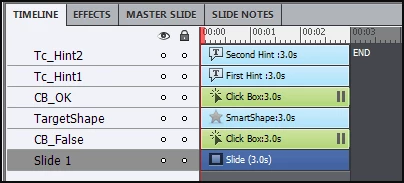
The TargetShape was just for me, so that I could see where to click on the correct spot.
The conditional advanced action will need two decisions. Here is the screenshot of the first Decision:
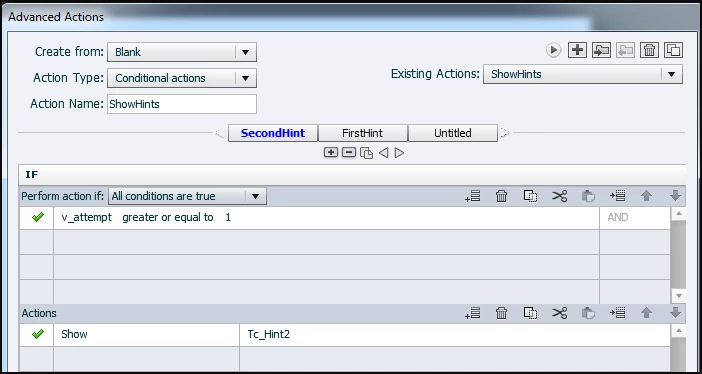
You'll see that this is the second hint appearing. Because actions in Captivate are always totally evaluated, this sequence is important. As I told before, if the second Hint is not in the same location as the first, you'll have to add Hide Tc_Hint1 to the Actions region. There is no Else action necessary.
Second decision:
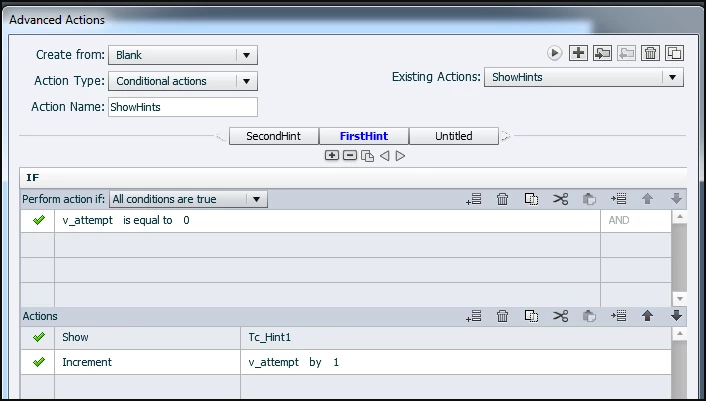
This will show the first hint AND increment the counter v_attempt, so that for the second click v_attempt will be 1 and the first decision will result in Correct, second hint will be made visible.



 AdChoices