


Known Participant
March 28, 2014
Question

Why do only some slide images appear when project is viewed in web browser?

  • March 28, 2014
  • 2 replies
  • 1202 views

I'm using the subscription version of Captivate 7 on my Mac OS 10.8.5. When I view my project in a web browser (I've tried Chrome and Safari), some of the timed images appear on the slide and some do not.

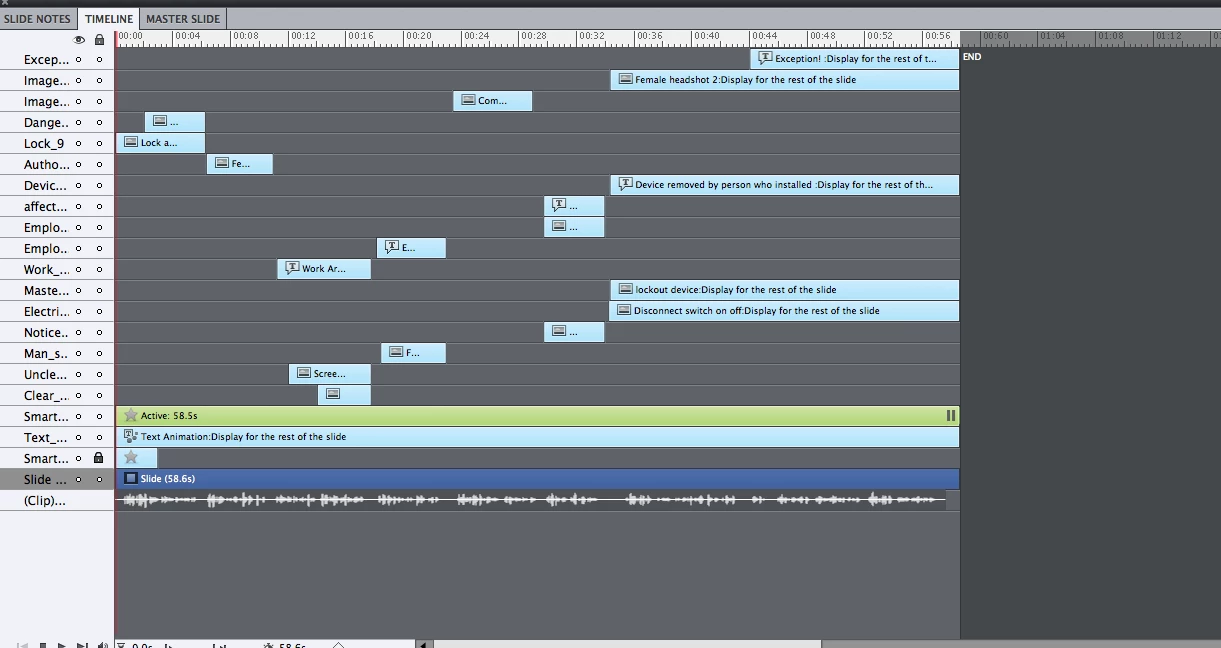
I do have a timing button on the slide but the button is set to pause after 58.6 seconds. No images show up after 34 seconds.

I've cleared the cache and duplicated the slide but I still can't get the last 5 items (4 images and 1 text caption)  to show up. Here's a screen shot of the slide's timeline.

Suggestions? I'm having this same problem in other slides as well. Thank you.
    This topic has been closed for replies.

    2 replies

    Participant
    July 13, 2015

    I am having this same issue and it is occurring with all five modules I am working on. Did anyone ever figure out how to get the images to appear?

    Lilybiri
    Legend
    July 13, 2015

    Check timeline, do you have pauses? Are you sure they are visible in output? Check if you don't have master slide objects that are on top?

    Participant
    July 13, 2015

    ‌i already checked everything that was mentioned in this thread. The only thing I can do to get an image to appear is take a screenshot and place it in exactly the same location as the image was. My original image is a png the screenshot is also a png. Is there a problem with png Images?

    RodWard
    Community Expert
    Community Expert
    March 28, 2014

    Have you verified that those objects all have Visible in Output checked?

    If so, try unchecking Visible in Output for that button you have there and then see if the other images show up.  Perhaps at runtime the button is actually pausing earlier than the timeline would appear to indicate.  So hiding the button might indicate this.

    DotdotAuthor
    Known Participant
    March 28, 2014

    Thanks for the suggestions. I did verify that all objects are Visible in Output.

    So, then, I unchecked the Visible in Output for that button but the last 5 objects still did not show up. Hmmm

    Other ideas? Thank you.

    Lilybiri
    Legend
    March 28, 2014

    I checked the master slide but there are no objects that could be obscuring the last 5 images.

    So I tried this--

    I inserted a new slide into the project and copied 3 of the 5 last images into it. I chose 3 just to narrow things down. Anyway, when I copied those 3 objects into the new slide, they all showed up in the web browser. Here's the timeline of that new slide--

    So then, I inserted another slide into the project and copied those same 3 objects into it. Then, I set the timing of those images so they would appear after 34 seconds. But this time, when I viewed THAT slide in the web browser, none of the objects showed up. Weird. Here's the timing for THAT slide--

    Why would those same 3 objects appear immediately in one slide but then never show up in the second slide when their timing is set to appear after 34 seconds?

    Thanks for suggestions!


    How did you preview? Did you wait long enough? More than 30 seconds can look like an eternity when nothing happens.